
Starting an Agent
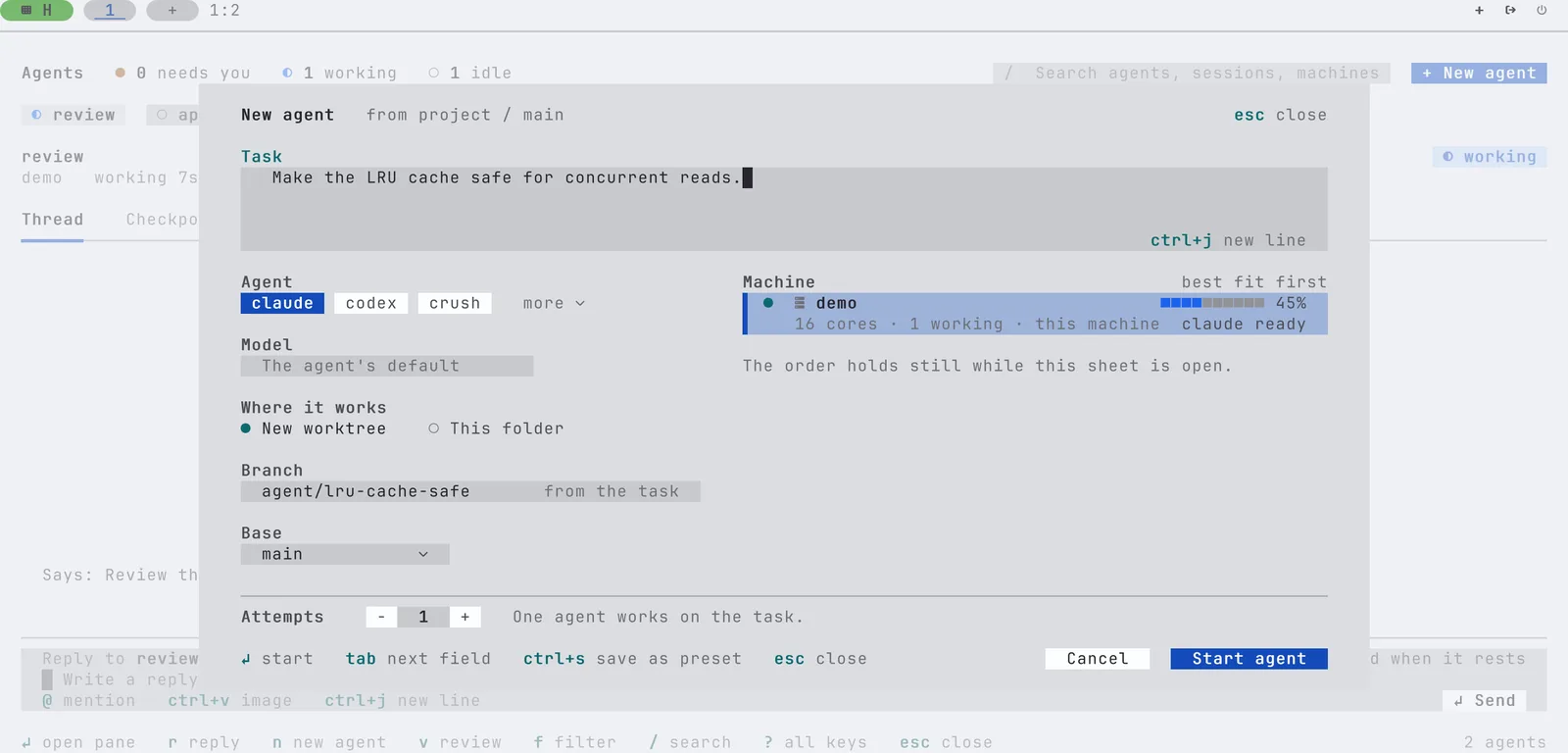
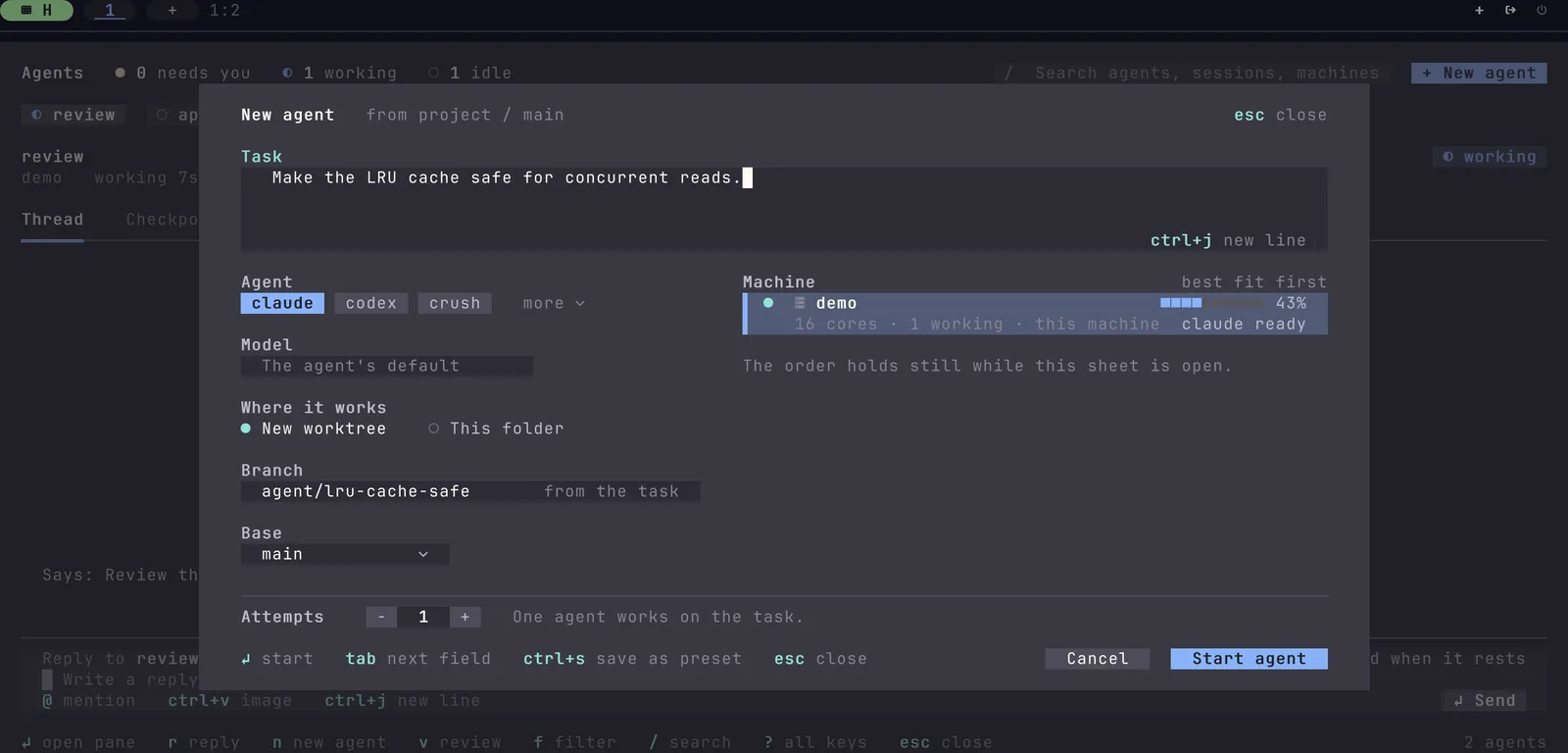
The New agent sheet in the agents view starts an agent with a task. Pick the agent, the model, the machine and where it works, and ask for up to 8 attempts.
The New agent sheet Unreleased starts a coding agent with a task, without leaving the agents view. Write the task, pick the agent and where it works, and press Enter. In a git repository the agent gets a new worktree on its own branch by default, so it never touches your working tree.
Quickstart
- Press Ctrl+B i to open the agents view.
- Press n, or click
+ New agent. - Type the task.
- Press Enter.
tuios makes the worktree and its branch, starts the agent in a new pane, and types the task once the agent is ready. The new agent shows up in the agents view as it starts.
The fields
| Field | What it does |
|---|---|
| Task | The first prompt. tuios types it when the agent is at its prompt. Ctrl+J adds a line |
| Agent | The agents that run now come first, then the ones installed on this machine. more lists every agent |
| Model | Passed to the agent as --model. Type one, or pick one that a running agent of the same kind reports. Empty uses the agent's default |
| Where it works | New worktree, on its own branch, or This folder |
| Branch | The new branch. It is named after the task, such as agent/lru-cache-safe, until you change it |
| Base | Where the branch starts. Type it, or pick a local branch |
| Machine | This machine and your linked hosts. The machine with the most free cores is first |
| Attempts | 1 to 8. Each attempt gets its own worktree and branch |
Uncommitted files stay in this folder. A new worktree starts from the base, not from your working tree.
Keys
| Key | Does |
|---|---|
| Tab, Shift+Tab | Next or previous field |
| ← → | Change the agent, where it works, the attempts or the button |
| Space or ↓ on the agent | Open the list of every agent |
| ↑ ↓ on the machines | Pick a machine |
| v on the attempts | Give each attempt a different agent |
| Ctrl+J | Add a line to the task |
| Ctrl+S | Save the choices, without the task, for the next new sheet |
| Enter | Start |
| Esc | Close the sheet and keep what you wrote for the next n |
The mouse works too: click a field, a choice, Start agent or Cancel. A start that fails keeps the sheet as it was, so you lose nothing. n is inbox_new_agent in [keybindings.inbox].
Where the agent works
New worktree goes through the same path as tuios fan. tuios makes a worktree beside the repository and a branch from the base. The agent starts in a new session for the worktree. The branch name follows git's rules for a ref. A base that starts with - is refused.
This folder goes through tuios start-agent: the agent starts in a new pane in the folder you are in. Use it outside a repository, or for a task that should change your working tree.
Many attempts
Set Attempts to 2 or more to give the same task to several agents at once. Each one works in its own worktree on its own branch, so the attempts never touch each other. v on the attempts gives each attempt a different agent, so you can compare Claude Code and Codex on one task. When they finish, compare their changes and keep one. See Comparing and keeping one.
All attempts start on the machine you picked.
On another machine
Pick a linked host in Machine to start the agent there. The agent works in a new worktree of the host's checkout of this repository. The host finds that checkout by the repository's origin. See Work from another machine.
This machine is ranked by its free cores. A host is ranked by how many agents work there, and its row says "no load report". The order holds still while the sheet is open.
From a shell
The sheet runs two commands that you can run yourself:
# This folder
tuios start-agent claude --prompt "Make the LRU cache safe for concurrent reads."

# Three attempts, each in a new worktree: two Claude Code, one Codex
tuios fan 3 --agent claude,claude,codex "Make the LRU cache safe for concurrent reads."
See start-agent and fan for their flags.
How do I
- Start an agent on a task without opening a pane first? Press Ctrl+B i, then n, type the task and press Enter.
- Let an agent change my working tree? Pick This folder.
- Race two agents on one task? Set Attempts to 2 and press v on it to give each attempt a different agent.
- Use the same agent and model every time? Pick them once and press Ctrl+S.
- Run the agent on my build machine? Pick the host in Machine. It needs a checkout of the repository.
Related
Inbox and Review
One list of everything your agents are waiting on, a view of every agent and its conversation, answers from wherever you are, safer approvals, replies queued for a busy agent, and a review of what an agent changed.
Agent Messaging
Let agents in different panes find each other, leave messages, ask questions and hand over files.