
swatch
A Go library that reads the desktop's colour theme as a palette with semantic roles, and follows it while your program runs. The first source is Omarchy.
tuios.dev/swatch reads the colour theme of the desktop your program runs on. It gives you a Palette with semantic roles: a background, a text colour, an accent, a border, the status colours and the sixteen ANSI colours. It also follows the theme while your program runs. tuios uses it to follow the Omarchy theme.
go get tuios.dev/swatchThe API reference is on pkg.go.dev.
Quickstart
Read the colour scheme of a terminal config file. termconfig.Parse finds the format itself:
p, format, err := termconfig.Parse(data)Each picture below is the Palette that this call returned for a theme file in one of the formats, drawn on the theme's own background:
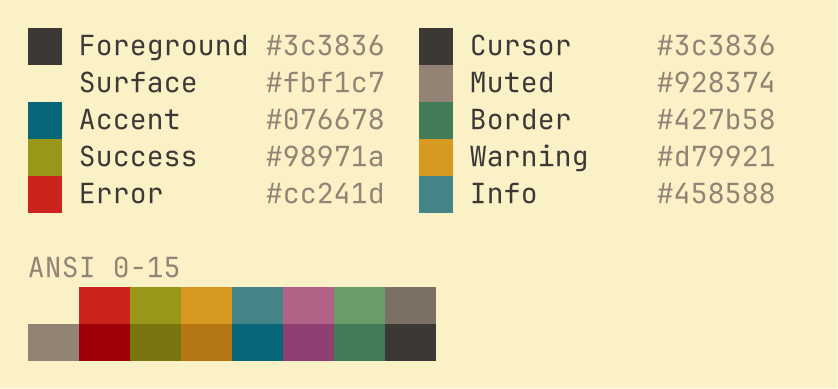
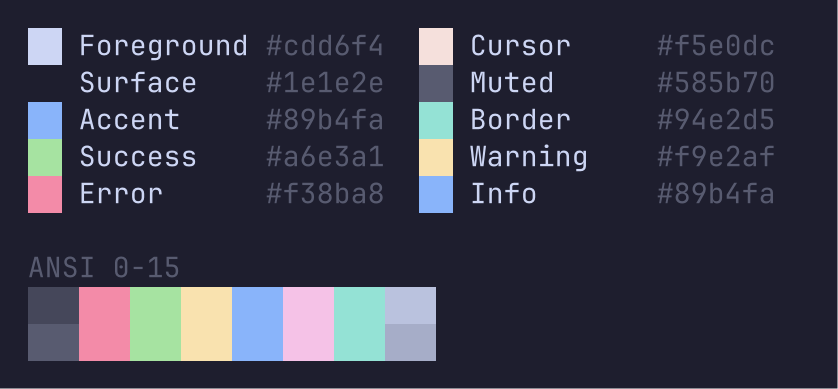
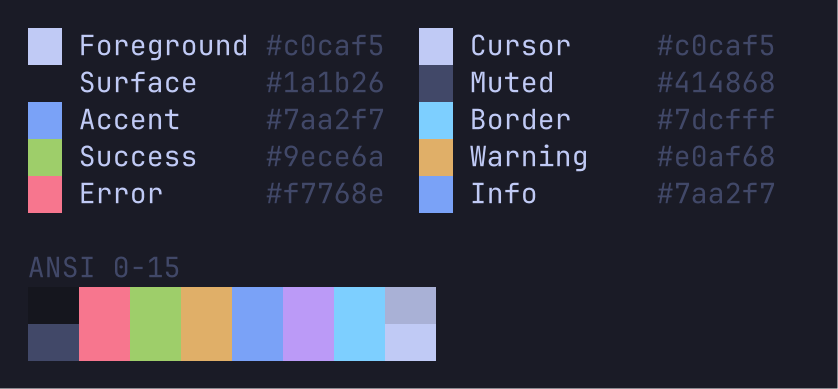
The sources are the files in tools/libshots/scenes/swatch/ of the docs repository. Every role of the palette is set, also when the file does not name its colour.
What is in it
- swatch: the
Palette, theSourceinterface, andWatch, which follows a source. - swatch/omarchy: the theme Omarchy has applied (Omarchy 4 and 3), and every installed Omarchy theme. The parser is a port of Omarchy's
omarchy-theme-color, held to the script's own output for every shipped theme. - swatch/termconfig: the colour scheme of a kitty, ghostty, alacritty or wezterm config file.
- swatch/teaswatch: Bubble Tea v2 messages for a change, and the terminal's own palette from OSC 10, 11 and 4 and mode 2031.
Theme files come from strangers, so swatch reads colours only. Nothing in a theme file is executed or expanded.
Read the Omarchy theme
p, err := omarchy.Current().Load()
if errors.Is(err, swatch.ErrNotFound) {
	return // not on Omarchy: keep your own colours
}
fmt.Println(p.Name, swatch.Hex(p.Accent), p.Light)
// Tokyo Night #7aa2f7 false
The fields are color.Color values, which Lipgloss v2 takes as they are.
Follow it in a Bubble Tea program
w, err := swatch.Watch(omarchy.Current())
if err != nil {
	return err
}
defer w.Close()

func (m model) Init() tea.Cmd { return teaswatch.Listen(m.watcher) }

func (m model) Update(msg tea.Msg) (tea.Model, tea.Cmd) {
	switch msg := msg.(type) {
	case teaswatch.ChangedMsg:
		m.styles = newStyles(msg.Palette)
		return m, teaswatch.Listen(m.watcher)
	}
	return m, nil
}
The watcher holds one inotify handle and two goroutines. It runs no timer and reads nothing while the theme stays the same. One Omarchy switch is one read, 50 ms after it. A switch to the theme already in force sends nothing.
The palette
| Role | Omarchy key |
|---|---|
Background, Foreground | background, foreground |
Cursor | bright_foreground |
Surface | lighter_background |
Muted | muted |
Accent | accent |
Border | the first colour of hyprland_active_border, else accent |
Error, Success, Warning, Info | red, green, yellow, blue |
ANSI | the mapping of Omarchy's kitty, ghostty and foot templates |
Light | mode = "light", a light.mode file, or a light background |
Raw holds every other key the theme defines or Omarchy derives, such as orange or dark_background.
How do I
- Follow the theme while my program runs? Call
swatch.Watch(source), and listen withteaswatch.Listenin Bubble Tea. - Read a terminal's config file? Call
termconfig.Load(path), or usetermconfig.Source(path)to watch it. - List every installed Omarchy theme? Call
omarchy.Themes(). - Get a colour as hex? Call
swatch.Hex(c). - Use a colour Omarchy defines but the palette has no role for? Read
p.Raw, such asp.Raw["orange"]. - Ask the terminal for its own colours? In Bubble Tea, use
teaswatch: it reads OSC 10, 11 and 4 and mode 2031.
API overview
| Name | Does |
|---|---|
Palette | The roles, the ANSI colours and the raw keys. |
Source, Static | Where a palette comes from. |
Watch, Watcher | Follow a source. |
omarchy | The Omarchy theme in force, and every installed one. |
termconfig | kitty, ghostty, alacritty and wezterm colour schemes. |
teaswatch | Bubble Tea v2 messages. |
Where it fits
- tuios follows the Omarchy theme with swatch, and turns the palette into its own theme.
- swatch gives colours. loom and shot take colours from your program, so a palette from swatch can feed either one.
Versions
The module is at v0. The API can change between minor versions. Its tags have the folder name as a prefix, such as swatch/v0.1.0. The source is in the swatch folder of the tuios repository, under the MIT licence.
vt
A terminal emulator in Go. Feed it what a program prints, and read the screen, the scrollback and the modes.
shot
A Go library that renders a terminal screen to PNG, SVG, HTML, ANSI or text, with an optional window frame.
tuios lives only at tuios.dev and github.com/Gaurav-Gosain/tuios. tuios has no X or Twitter account. An account that offers a tuios token or presale is not this project.