Sessions6 min read
Restarting the daemon without losing your place
Moving the tuios daemon to a new build used to mean detach, kill-server, start again, and attach every other client by hand. Now tuios restart-server shows what stops, restarts on the newest build, and every client comes back by itself. How the restart picks a binary, survives killing its own pane, and tells a restart from a stop.
GGGaurav Gosain
I update tuios a lot, as you might guess. Several times a day on some days.
And every update had the same annoying ending. The new binary is on disk, but
the daemon that holds all my panes is still the old one. To move it, I had to
detach, run tuios kill-server, start tuios again, and then go to every other
terminal that was attached and attach it again by hand. Nothing on the way
told me what the kill was about to stop.
That's fixed now. Here is the whole thing from inside tuios, with an agent, a web server and a shell open:
It landed as four PRs this week, from #888 to #934, and goes out in v0.11.0.
Say what stops, first
The first piece is a command, tuios restart-server. Before it does
anything, it shows a plan: the version running now, the version you get after,
which binary that comes from, every program that will stop, and what comes
back. Then it asks.
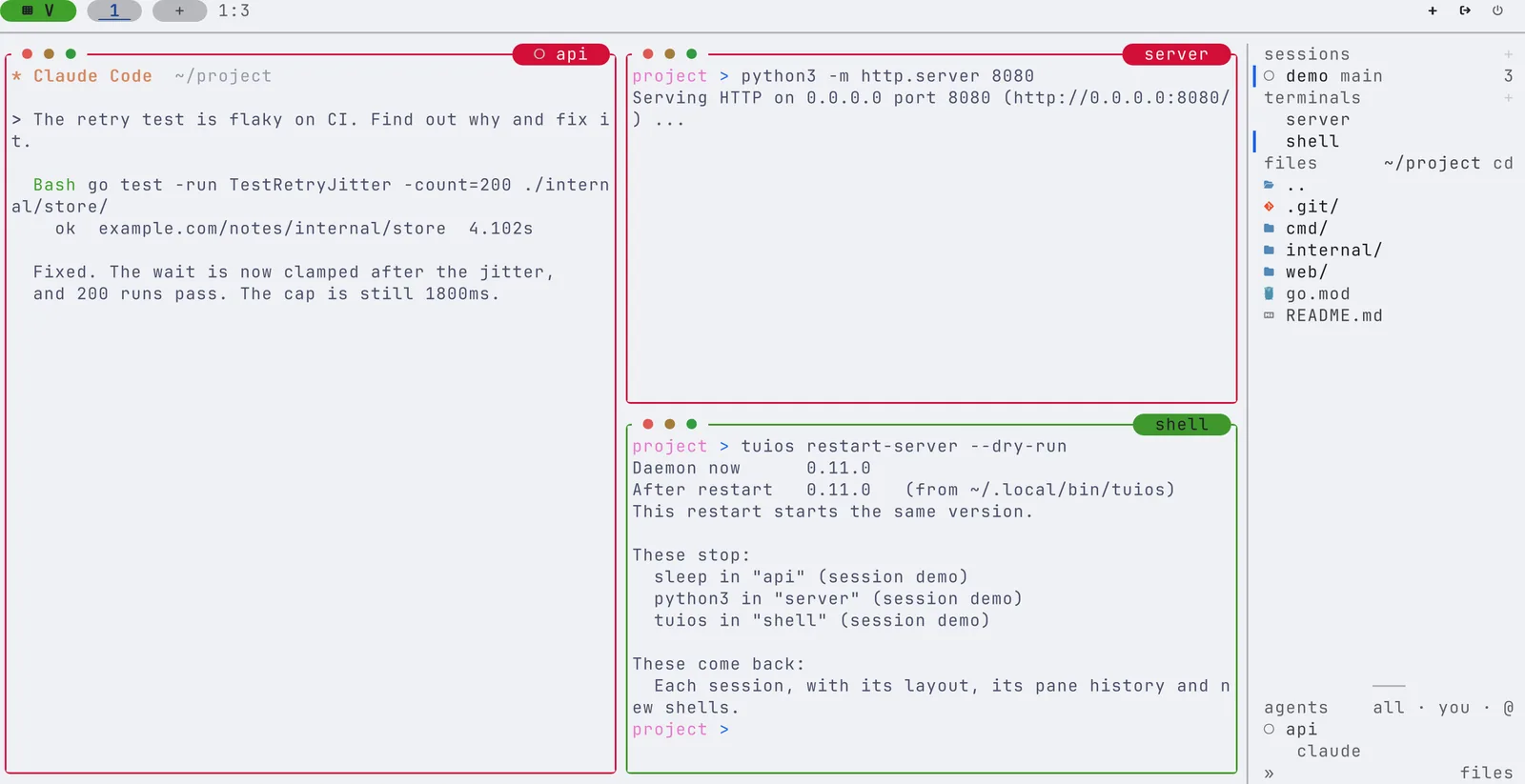
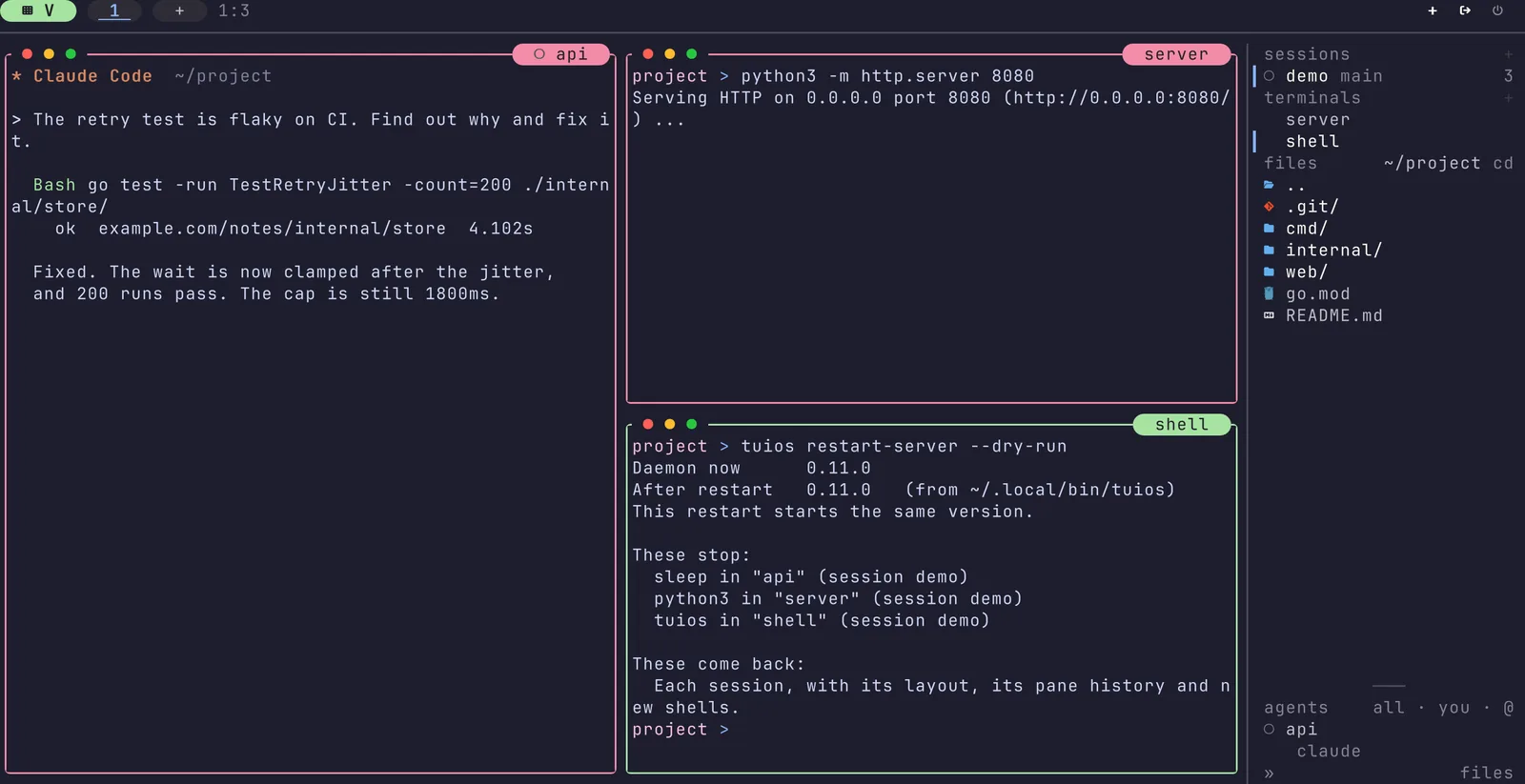
The programs in your panes do stop. That's the honest part of the plan. What comes back is each session with its layout, its pane history and fresh shells in the same folders, from the session files tuios saves and now reads back. An agent that can resume its conversation is named in the plan, and offered back after the restart.
The app shows the same plan. When the daemon runs an older build than the client, the dock says so, and a click (or the jump key) opens the dialog from the clip. It's also in the palette and in the settings. The dialog and the CLI share their words from one package, so they never disagree about what a restart does.
There's one more check between the dialog and the restart. The dialog sends a digest of the plan you agreed to. If a program started or stopped in the seconds since, the restart refuses with "What a restart stops changed after you agreed to it." and nothing changes. You only ever agree to the list you saw.
Which tuios?
"Restart on the new build" sounds simple until you ask which file is the new
build. My first thought was /proc/self/exe, the binary that's running. That's
exactly wrong after an update. The updater replaces the file at the path, and
/proc/self/exe still points at the old inode, so you'd restart on the
version you were trying to leave.
So restart-server looks at two candidates: its own path, which tuios update
replaces in place, and the tuios on your PATH, which Nix, mise, asdf and
Linuxbrew like to move around. It runs --version on both and takes the
newer. If that's the same version as now, the plan says "This restart starts
the same version.", so you're never surprised.
Killing the pane you're typing in
The fun edge: you run tuios restart-server in a tuios pane. Stopping the
daemon kills that pane, which kills the shell, which kills restart-server
halfway, after the stop and before the start. Now you have no daemon at all.
The stop and the start now run in a small worker in a process session of its
own, with SIGHUP ignored. The command you typed can die with its pane, and the
worker still starts the new daemon. Each step goes to a restart.log beside
the daemon log, and tuios restart-server --last tells you how the last one
went. An e2e test does exactly this: it runs restart-server --yes inside a
pane of the daemon it restarts, and a daemon has to hold the session again
afterwards.
A lock beside the socket lets only one restart run at a time. The second one says "Another restart of the daemon is running." instead of racing.
Coming back, in the same process
When you restart from the app, the client doesn't quit and ask you to start
it again. On Unix it execs the new build in place, as
attach <session> --after-restart, so it keeps its pid and its terminal. It
carries its flags along, --debug and --server included. The e2e test
checks that the same pid is attached to the same session afterwards, on a
daemon of the newer build, with both panes, their names and their history.
The other clients
That covered the client that asked for the restart. Every other client attached to the same daemon still quit with "The connection to the TUIOS daemon was lost", and a client couldn't tell a restart from a stop or a crash anyway. They all look like a closed socket.
So #891 gave the daemon a goodbye. Before it closes, it tells each client why:
| The daemon | The client |
|---|---|
| says "restart" | waits up to 15 s for the new daemon, then reattaches |
says "stop" (plain kill-server) | quits at once, as before |
| says nothing (a crash, or a daemon older than this) | waits up to 6 s, in case one comes back |
Each goodbye write has a 500 ms deadline, so a client that isn't reading can hold the shutdown back by half a second at most. While a client waits, it dials every 500 ms, the dock says "Waiting for the daemon. Keys are not sent.", and an attached client runs no timer for any of this.
Keys typed during the wait are dropped on purpose, not held. After a restart
the panes are new shells, so a held key could land in a different program
than the one you were typing to. I'd rather lose a keystroke than send rm to
the wrong place.
What review found after it landed
The final review of the stack found three real things, fixed in #934:
- A waiting client capped its handshake at 2 s, then read the attach reply with the usual 30 s deadline. A daemon that said hello and then stalled kept the client waiting about 32 s, while the docs promised 15. The attach reply is now bound by the end of the wait.
tuios hosts sync --restartstopped remote daemons with a plainkill-server, so their clients heard "stop" and quit instead of reattaching. The scripts now pass--restart, and fall back to the plain stop for a binary older than the flag.- After a reattach, the agents view's live box for an agent on another workspace could stop updating until you pressed a key.
The three feature PRs carry 15 negative controls on top of their e2e tests, each one a piece of the restart cut out on purpose to check that a test fails. One of them runs the steps in the command itself instead of the worker, and no daemon comes back, which is the pane case from above.
What it cost
The three feature PRs added 57,344, 57,344 and 24,576 bytes on linux/amd64.
What it does not do yet
A restart still stops the programs in your panes. A long build or an agent in
the middle of a turn ends, and comes back as a fresh shell with its history.
Swapping the daemon binary while the pane programs keep running is the bigger
goal, and its first PR is in review. Until then, tuios update followed by
tuios restart-server is two commands, it tells you exactly what it's about to
do, and nobody has to attach anything by hand :)
The restart page has every flag.