Rendering11 min read
Why nord turned teal on 256-colour terminals
At 256 colours, nord's grey ground #2e3440 came out as index 23, a teal, and Catppuccin Latte's red came out grey. The step-down picked from the colour cube by channel thresholds. The fix moved it to OKLab with a rule for neutrals, a test over all 344 bundled themes went from 339 wrong colours to 0, and one light theme is still not right.
GGGaurav Gosain
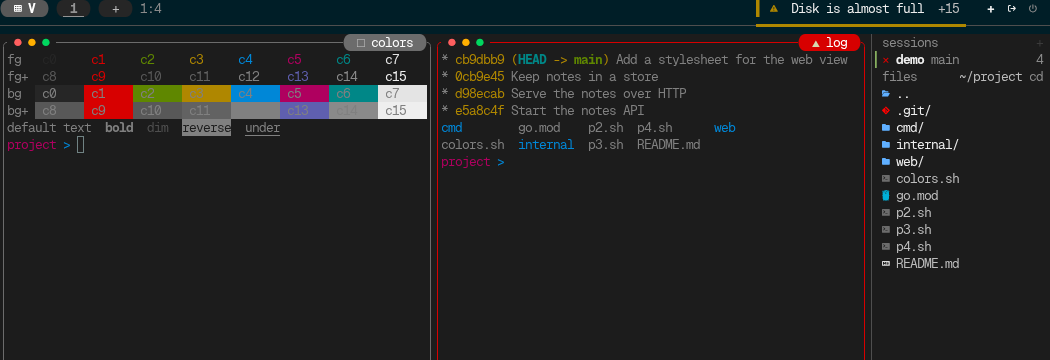
Here is nord in tuios on a terminal that only does 256 colours. This is the
whole screen, drawn from the bytes tuios sent with COLORTERM empty and the
theme's own palette in the host terminal:
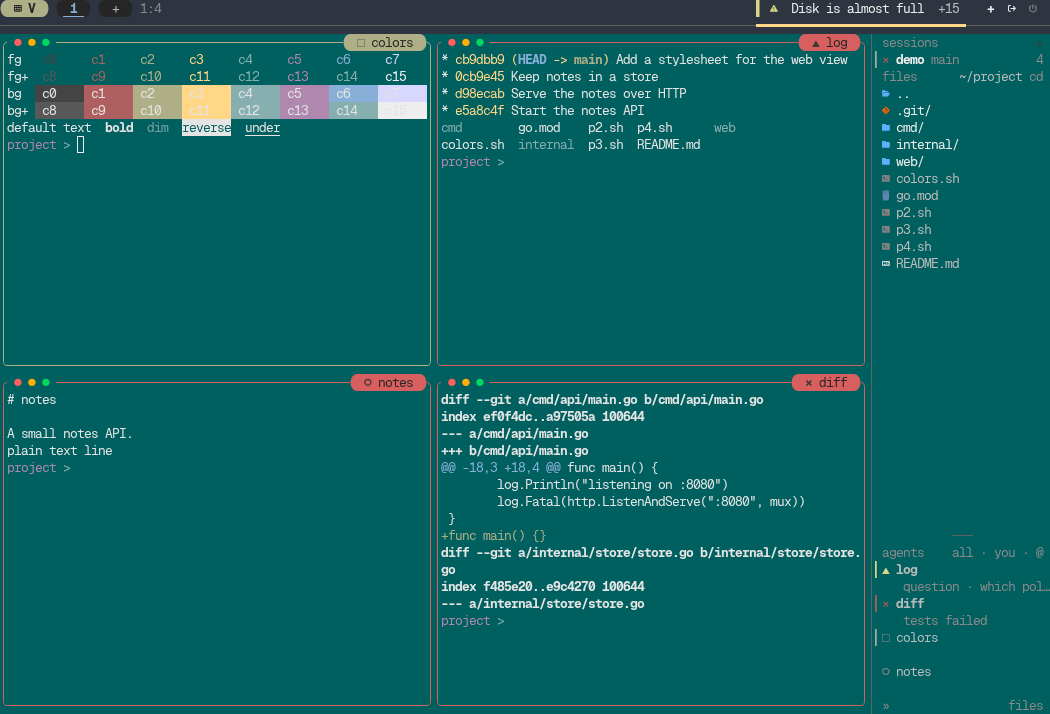
Nord's ground is #2e3440, a slate grey with a little blue in it. On this
screen it is #005f5f, which is xterm index 23, and nobody would call that
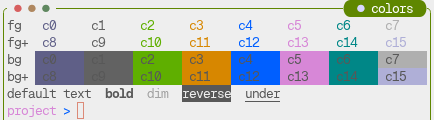
grey. Here is the same scene with the fix:
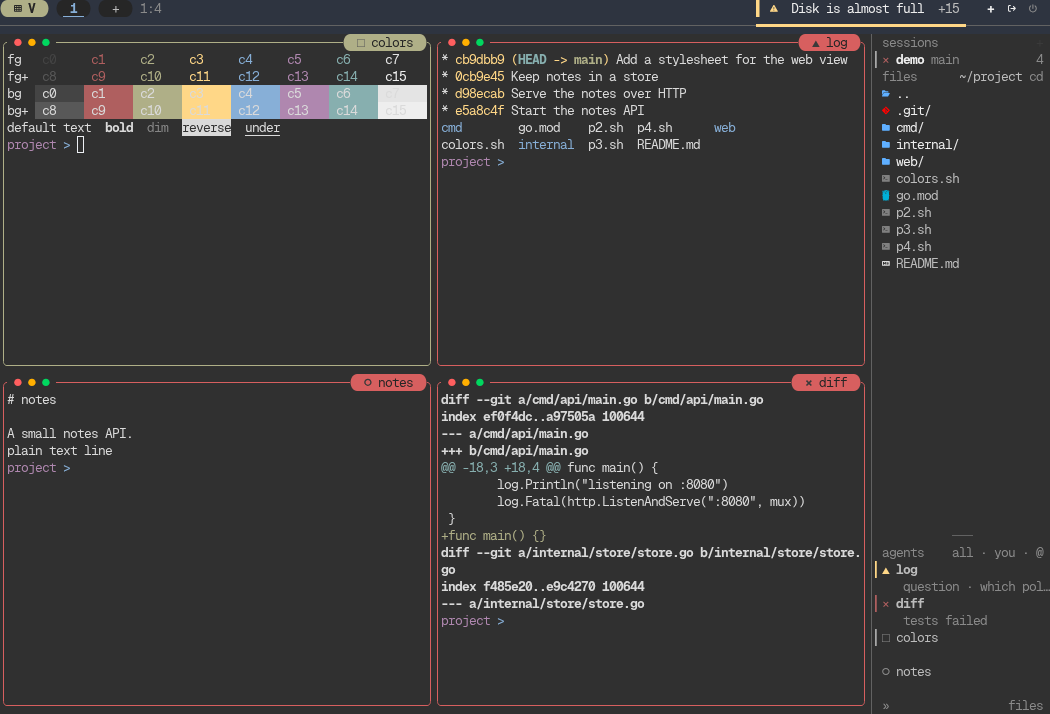
The fix is #858. It also closes #510, where Catppuccin Latte's red came out grey, which looks like the opposite bug and turned out to be the same one.
What a 256-colour terminal has
The 256-colour palette is three things glued together:
- 0 to 15, the terminal's own sixteen colours, which the user's palette decides.
- 16 to 231, a 6x6x6 cube. Each channel takes one of six levels:
00,5f,87,af,d7andff. - 232 to 255, a ramp of 24 greys, from
#080808to#eeeeeein steps of 10.
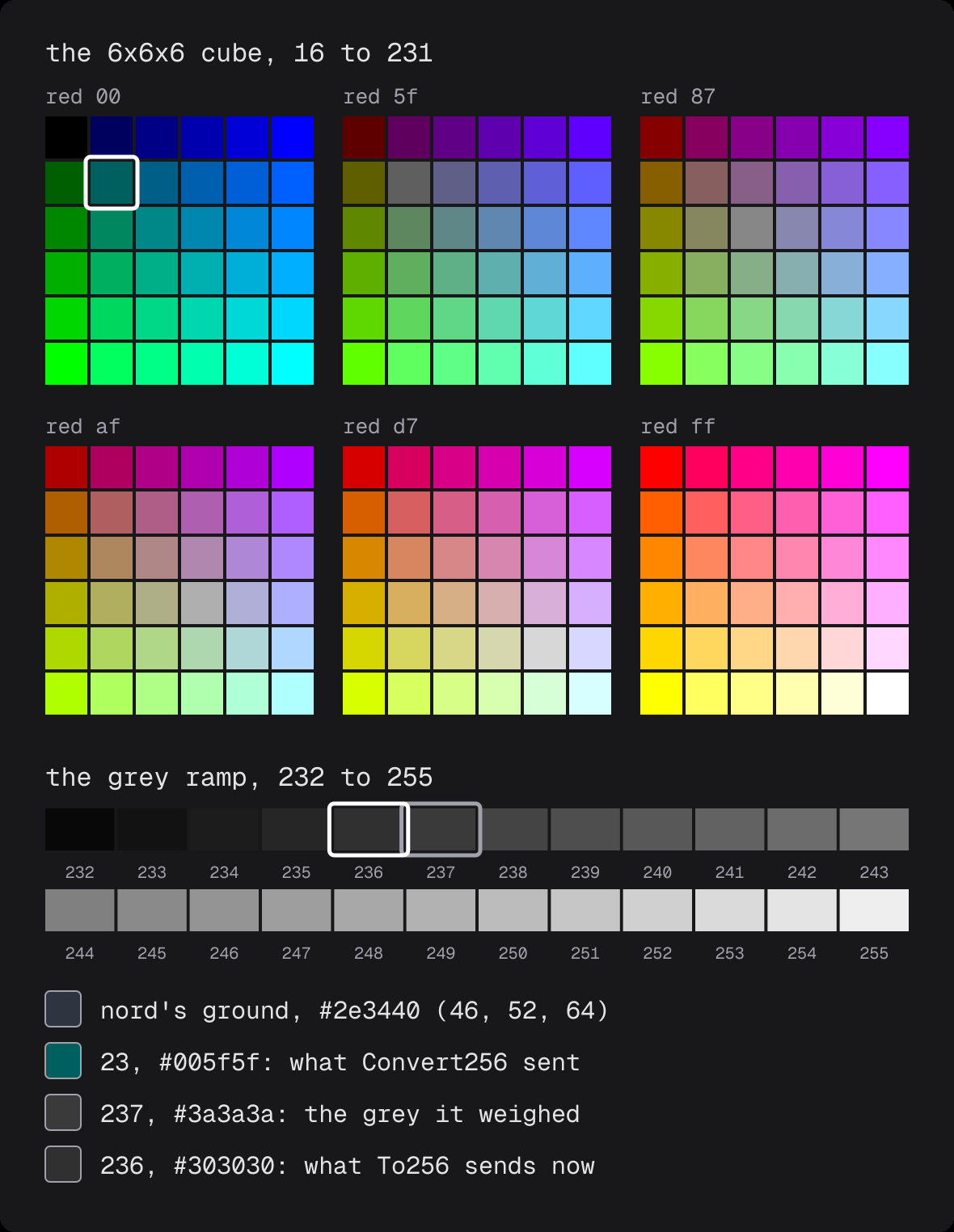
The cube's levels are not evenly spaced. The gap from 00 to 5f is 95, and
every gap after it is 40. So the dark end of the cube is very coarse, and dark
is exactly where a terminal theme puts its ground. Between black and #5f5f5f
the cube has no grey at all. The grey ramp has nine.
How #2e3440 became 23
tuios writes its frame through Bubble Tea, and at 256 colours the frame writer
steps every truecolor value down with ansi.Convert256 from
charmbracelet/x/ansi. It is a port of tmux's colour.c, and it starts by
putting each channel on the cube:
func to6Cube[T int | float64](v T) int {
	if v < 48 {
		return 0
	}
	if v < 115 {
		return 1
	}
	return int((v - 35) / 40)
}
Nord's ground is red 46, green 52, blue 64. Red is under 48, so it gets level 0.
Green and blue are over 48, so they get level 1. That is the cube entry
(0, 1, 1), which is 16 + 6 + 1 = 23, #005f5f. Two channels that differ by six
landed on different sides of one threshold, and a grey with a blue cast became
a cyan.
Convert256 does then look for a grey. It averages the channels, gets 54, and
picks 237, #3a3a3a. Then it compares the two:
colorDist := col.DistanceHSLuv(c2)
grayDist := col.DistanceHSLuv(g2)

if colorDist <= grayDist {
	return IndexedColor(16 + ci) //nolint:gosec
}
return IndexedColor(232 + greyIdx)
And 23 won. It only ever weighs one grey, the one at the average, against one cube entry, the one the thresholds picked. 236 was never a candidate.
Latte's red went the other way. #d20f38 in, 241 out, a mid grey. The cube
entry the thresholds picked for it lost to the grey on that distance. So one
bug made a grey theme teal and a red text grey.
Why only half the screen was wrong
The odd part was that the dialogs looked fine. The chrome palette, the colours
of the panels, lists and dock, already had its own step-down, overlay.To256,
and it already kept greys on the grey ramp. I wrote it a while ago, when the
charmtone greys turned navy at 256 colours.
But a pane's sixteen ANSI colours and the painted grounds never went through
it. They reached the frame writer as truecolor, and the frame writer did its
own step-down with Convert256. So the chrome said grey and the panes under it
said teal.
The fix gives a pane's emulator the theme at the depth in force, in
theme.EmulatorColors:
d := Depth()
if d == overlay.Depth16 {
	return nil, nil, nil, pal, false
}
fg, bg, cur, pal = TerminalFg(), TerminalBg(), TerminalCursor(), GetANSIPalette()
if d == overlay.Depth256 {
	fg, bg, cur = to256(fg), to256(bg), to256(cur)
	for i := range pal {
		pal[i] = to256(pal[i])
	}
}
At 256 colours every colour of the theme goes through To256 once, when the
theme or the depth changes. The emulator then holds index colours, and the
frame writer passes an index through untouched. The theme grounds get the same
treatment.
At 16 colours the emulator gets no theme at all. Slot 1 goes out as slot 1, and the terminal paints it with its own red. That is the only honest answer at 16 colours: the terminal's palette is the user's, and any guess tuios makes from the xterm defaults is worse than asking the terminal to use its own.
To256
To256 is in internal/overlay/depth.go, and it decides in OKLab, a colour
space where distance is close to how different two colours look. Chroma, how far
a colour is from grey, comes first:
ch := okChroma(c)
if ch < greyChroma {
	return nearestGrey(c)
}
q := nearest256(c)
if ch < tintChroma {
	if g := nearestGrey(c); Distance(g, c) < Distance(q, c) {
		return g
	}
}
return q
There are three bands:
- Below 0.035, a neutral. It goes to the grey ramp, by luminance. Nord's
ground has a chroma of 0.023, so it goes to 236,
#303030, and never meets the cube. 0.035 sits between the charmtone greys (0.01 to 0.02) and the least saturated accent tuios ships (0.06). - 0.06 and up, a colour. It goes to the nearest entry that is not a grey.
Latte's red, chroma about 0.22, goes to 160,
#d70000. - In between, a tint. The nearest grey and the nearest colour compete, and the nearer one in OKLab wins. I come back to why this band exists below.
"Nearest" is not plain OKLab distance either. With six levels a channel, a dark
or muted colour is often about as far from an entry of its own hue as from one
of another hue that happens to match its lightness. Plain distance took the
other hue: a dark green #002e18 went to the dark red 52. So nearest256
weighs hue four times as much as lightness and chroma:
dl, da, db, dc := v.l-e.l, v.a-e.a, v.b-e.b, vc-e.c
dh2 := max(da*da+db*db-dc*dc, 0)
if d := dl*dl + dc*dc + hueWeight*dh2; d < bestD {
	best, bestD = e.idx, d
}
The hue part is the part of the a-b distance that chroma does not explain. A
lightness step is something you barely notice in a terminal. A green that turns
red is something you notice right away. Now #002e18 goes to 22, #005f00.
All of this runs once per theme or depth change, never per cell or per frame.
To256 itself measured about 1.1 µs before and 1.2 µs after, inside the noise.
A test over every theme
tuios bundles 344 themes, and I was not going to look at nord, call it fixed,
and hope for the other 343. TestThemeColorsKeepTheirKindAtEveryDepth walks
every one of them at 256 and at 16 colours. For each theme it checks a pane's
sixteen colours as the emulator resolves them, the theme ground and its text,
and the chrome roles. And it checks the colour the terminal is finally sent,
after the frame writer's own conversion, because that conversion is where the
bug lived. The rules:
- A neutral (chroma under 0.035) must land on a grey, black or white.
- A colour (chroma 0.06 or more) at 256 must land on a colour entry, within 40 degrees of its hue.
- At 16, pane slot i must go out as slot i.
The test does its own OKLab conversion instead of calling tuios's, so it does not share the code it checks. I ran it on the commit just before the fix with the test file copied in:
339 theme colours changed kind at 256 colours:
3339 theme colours changed kind at 16 colours:
On main it passes. A few of the 339, to show the shape of it:
andromeda ground #262a33: neutral (chroma 0.018) sent as 17 #00005f
alien_blood pane slot 7 #647d75: neutral (chroma 0.032) sent as 66 #5f8787
abernathy pane slot 7 #faebd7: neutral (chroma 0.031) sent as 230 #ffffd7
Looking at all of them
A rule like "chroma below 0.035" is easy to get right and still make something look worse. So for the review I rendered every theme, all 344, at 256 and at 16 colours, before and after, as a 150x42 scene with four panes (the sixteen colours as text and as grounds, a git log, a diff and a README) and the sidebar with agents in each state. Then I compared them as images and cell by cell.
The cell counts for nord, in that scene:
| nord at 256 colours | before | after |
|---|---|---|
cells on index 23, #005f5f | 5,854 | 0 |
cells on index 236, #303030 | 0 | 5,854 |
The first version of the fix did not survive this. It sent every colour with a chroma of 0.035 or more to a colour entry, with no exceptions. That fixed 27 dark themes whose ground had been a colour and should have been grey, nord among them. It also broke 18 dark themes whose ground had been a grey and became a colour. Solarized was one:
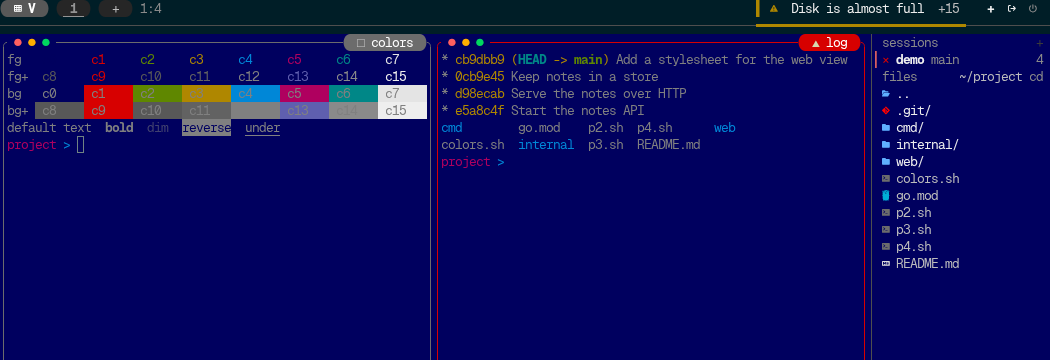
Solarized's ground is #001e27. Its chroma is 0.040, just over the line, so it
had to be a colour, and the nearest one was navy 17. 5,861 cells of navy.
h4x0r's red theme, #200101, went to the dark red 52, with red text on it.
The problem is the dark end of the cube again. Its darkest colours are far more
saturated than a dark theme's tinted ground: #00005f has a chroma of about
0.15, and #001e27 has 0.040. So a slightly blue black is closer, by any
measure, to a grey than to the bluest thing the cube has. That is the middle
band in To256. Below 0.06, the nearest grey competes, and it wins when it is
nearer:
With that, the final version moved 45 dark grounds from a colour to a grey and
2 from a grey to a colour. The 2 are qb_64_super_dark_blue (#000027) and
zeonica (#01001d). Both are blacks with real blue in them, and navy 17 is a
fair answer for them, so I left it.
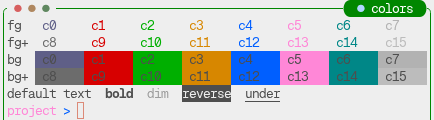
Latte's red, the bug from #510, is red again:
Warnings on light themes
The renders found one more thing the test could not. On a light theme, tuios moves the chrome's inks until they read on the light rows, and at 256 colours only the dark cube entries read on a light ground. A light theme's yellow is often a rust or a brown, and with hue weighted the way it now is, the nearest dark entry for a rust can be a red.
seoulbones_light put its warning on 124, #af0000, right next to its error on
125, #af005f. Those two are 30 degrees apart in OKLab hue and read as the same
red in a terminal cell. A warning that looks like a failure is worse than a
warning in the wrong shade of yellow.
So b83c496e adds
WarningApart256: when the warning sits within 35 degrees of the error, it
moves to the amber entry, from orange to olive, nearest amber in hue that still
reads on every row. seoulbones_light's warning is amber now.
What is still wrong
gruvbox_light. Its warning is #99630f and its error is #cc241d, and at 256
colours both are 124 on main. I checked with a probe against the merged code:
gruvbox_light     warning {153 99 15} -> 124 | error {204 36 29} -> 124
tokyo_night_light warning {122 79 16} -> 124 | error {135 65 78} -> 124
WarningApart256 sees the clash and looks for an amber. But on gruvbox_light's
cursor row, no amber entry in the cube clears the contrast floor tuios holds
marks to. So the function gives up and keeps the warning as it was, on
purpose. The doc comment says why:
// It returns warning unchanged when the two are apart, when either is a
// neutral, or when no amber reads. The last is left alone on purpose: on a
// light theme's cursor row no amber clears the mark floor for gruvbox_light or
// tokyo_night_light, and a warning that reads beats one that differs.
Here it is in the sidebar. On the left is Catppuccin Latte, where the waiting agent's ▲ is amber and the failed one's ✕ is red. On the right is gruvbox_light, where both are the same red:
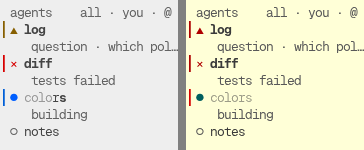
The glyphs still differ, ▲ and ✕, so you can still tell the two apart. The colour just doesn't help there, and I haven't found a fix I like yet. If you run gruvbox_light on a 256-colour terminal, I'd love to hear what you would want that warning to look like. An issue is the best place for it.
The path the colours took
The colour maths I wrote was fine. The bug was in a path I did not know the
colours took. The chrome went through To256, the panes went around it, and
both ended at the same frame writer. The test that caught it checks the bytes
the terminal is sent, after every step-down, and that is the only reason it
could see one that happened after tuios was done with the colour.
The test was not enough on its own, though. It found none of the 18 themes the first version made worse. The renders did. A rule for 344 themes needs someone to look at 344 themes, and I was glad I did before it shipped. The fix is on main and goes out in the next release.