latest release16 min read
v0.12.0
Fixes a denial of service in tuios ssh, GHSA-m75w-mvwc-578j. Also quick look and dragging files from the rail, tuios tutor, the Settled shelf, the task board, calm mode, return notes and a live terminal in the rail.
GGGaurav Gosain
New here? tuios tutor now teaches the basics in your own terminal. See The tutor.
tuios 0.12.0 makes the files in the rail useful: drag a file onto a pane to type its path, and press space to look inside it first. Agents get a task board, and you can bring back many agents at once after a restart. A settled agent stays out of your way until it needs you. Calm mode stops motion and quiets messages with one key. Return notes tell you what a session or a pane is for when you come back to it. The rail can run a live terminal of its own.
This release also fixes a denial of service in tuios ssh. If you run tuios ssh where other people can reach it, please update. Read Security first.
Install
brew install tuios                     # Homebrew (macOS, Linux)
yay -S tuios-bin                       # AUR (tuios-web-bin for the web server)
nix run github:Gaurav-Gosain/tuios     # Nix
curl -fsSL https://raw.githubusercontent.com/Gaurav-Gosain/tuios/main/install.sh | bash
go install github.com/Gaurav-Gosain/tuios/cmd/tuios@v0.12.0
docker run -it --rm ghcr.io/gaurav-gosain/tuios:v0.12.0
A binary installed by the script or from an archive updates with tuios update. Then run tuios restart-server to move the daemon to the new build. The restart stops the programs in your panes. Each session comes back with its layout, its pane history and new shells.
Before you upgrade
- macOS 13 or later. tuios is now built with Go 1.27.3, which needs macOS 13 (Ventura) or later. On macOS 12 or earlier, stay on v0.11.1 (#1342).
- Restart the daemon. The SSH fix and most other fixes are in the daemon. An old daemon keeps the old behaviour until you run
tuios restart-server. There is no live move from a v0.11.1 daemon, because the handoff format is now version 2 (#1365). - Copy commands that print nothing. A
copy_commandor copy pipe that exits 0 and prints nothing no longer fills the clipboard. A command such asxclip -selection primary >/dev/nullnow leaves the clipboard as it was. This matches tmux (#1372). - Resume keeps your flags. An agent now resumes with the flags you started it with, such as
--model. A flag that turns approvals off gets a warning, anddaemon.resume_agents = "auto"does not resume that agent. Pressyto resume it (#1359). - A quiet agent can show as
unknown. A hooked agent that reportedworkingand then sends no report for 10 minutes now readsstate: unknownandreason: silentinlist-agentsandget-agent-state. Set[agents] silent_after = "off"to turn this off (#1353). - Settled replaces Earlier. The Earlier group in the agents view is now the Settled shelf (#1360).
- Shorter info messages. An info or success message now stays up for 2 seconds, not 6. Set
notifications.durationto change this (#1210). - The
asciiglyph set.glyphs = "ascii"now also draws the agent state marks in ASCII (#1046).
Security
A client could stop tuios ssh from serving anyone
v0.12.0 fixes GHSA-m75w-mvwc-578j. It affects v0.11.1 and earlier. A CVE is requested. Thanks to @Gsirawan for the report. I am very grateful for it.
tuios sshhad no time limit on the SSH login and no limit on connections or sessions. A client that did not finish its login kept its connection open for as long as it liked.- Many such connections could use up the server's resources. In daemon mode this could also stop the daemon from opening panes.
- Now
tuios sshcloses a login that takes longer than 120 seconds. It also limits the logins in progress to 32 and the open sessions to 64. A new[ssh]section in the config file and four new flags ontuios sshset these limits, and an optional idle timeout (#1298).
What you notice: nothing, in normal use. If you run tuios ssh where other people can reach it, update and restart it. When the session limit is reached, a new client gets a message that says so. See SSH server limits.
Other hardening
- A file that a linked machine or a paired phone writes here gets your umask, and never group or world write (#1295). Thanks to @Gsirawan for the report.
- A new setting,
files_max_entries, limits how many new files and folders one linked machine makes here in ten minutes. The default is 20,000 (#1296). Thanks to @Gsirawan for the report. - A linked machine with
filescan no longer read the credentials of more common tools, or write the config folders of the agent tools that tuios supports (#1288). Thanks to @Gsirawan. - tuios-web warns when your password is shorter than 12 characters (#1185). Thanks to @Gsirawan.
- The mailbox between agents keeps its send limits bounded (#1277). Thanks to @Gsirawan.
Highlights
Learn in your terminal
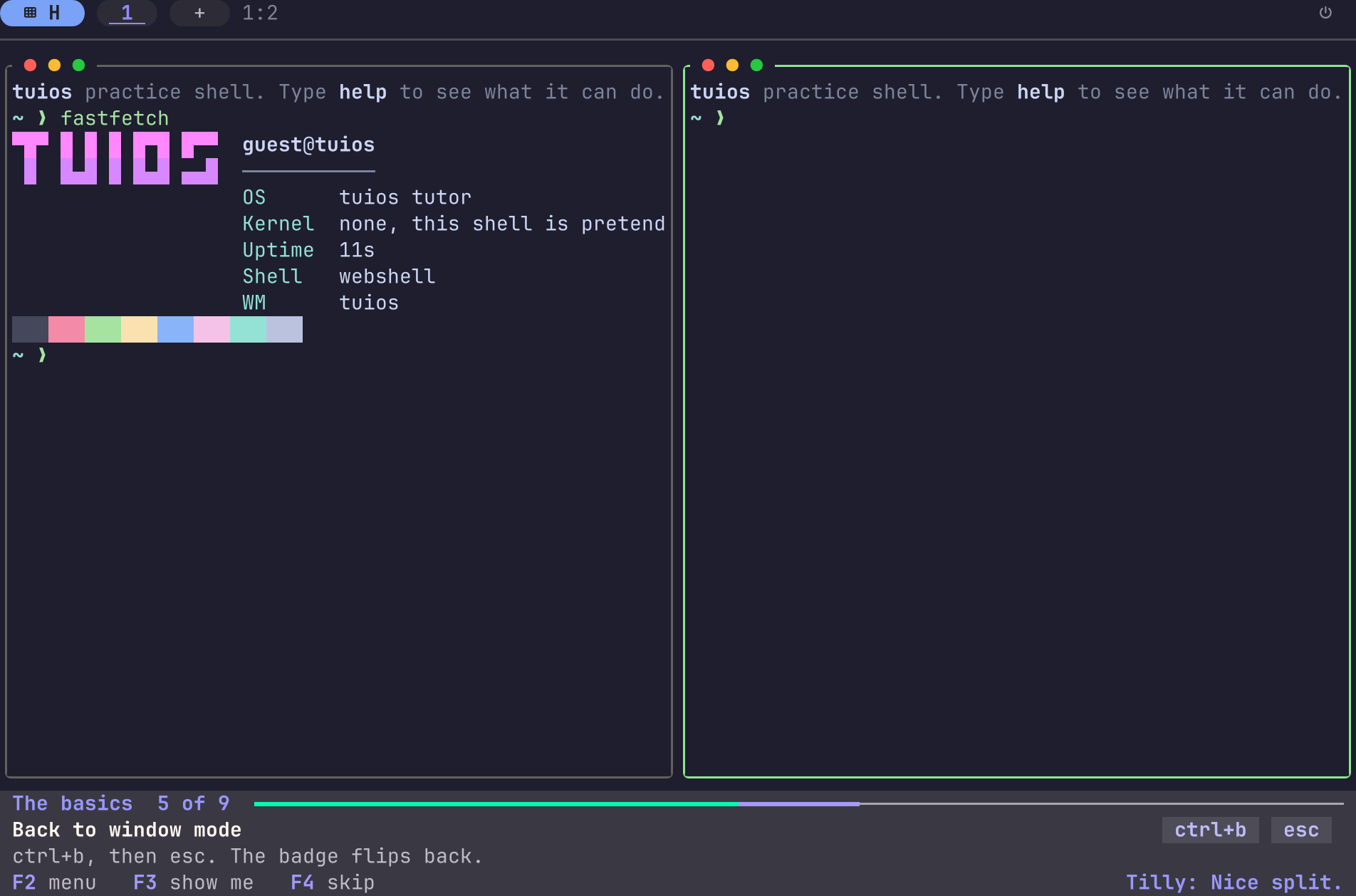
tuios tutor. Learn the basics in your own terminal, in nine steps. The shell and the files are a practice copy, so nothing on your computer changes. The tutor starts no daemon (#1339).
The files in the rail
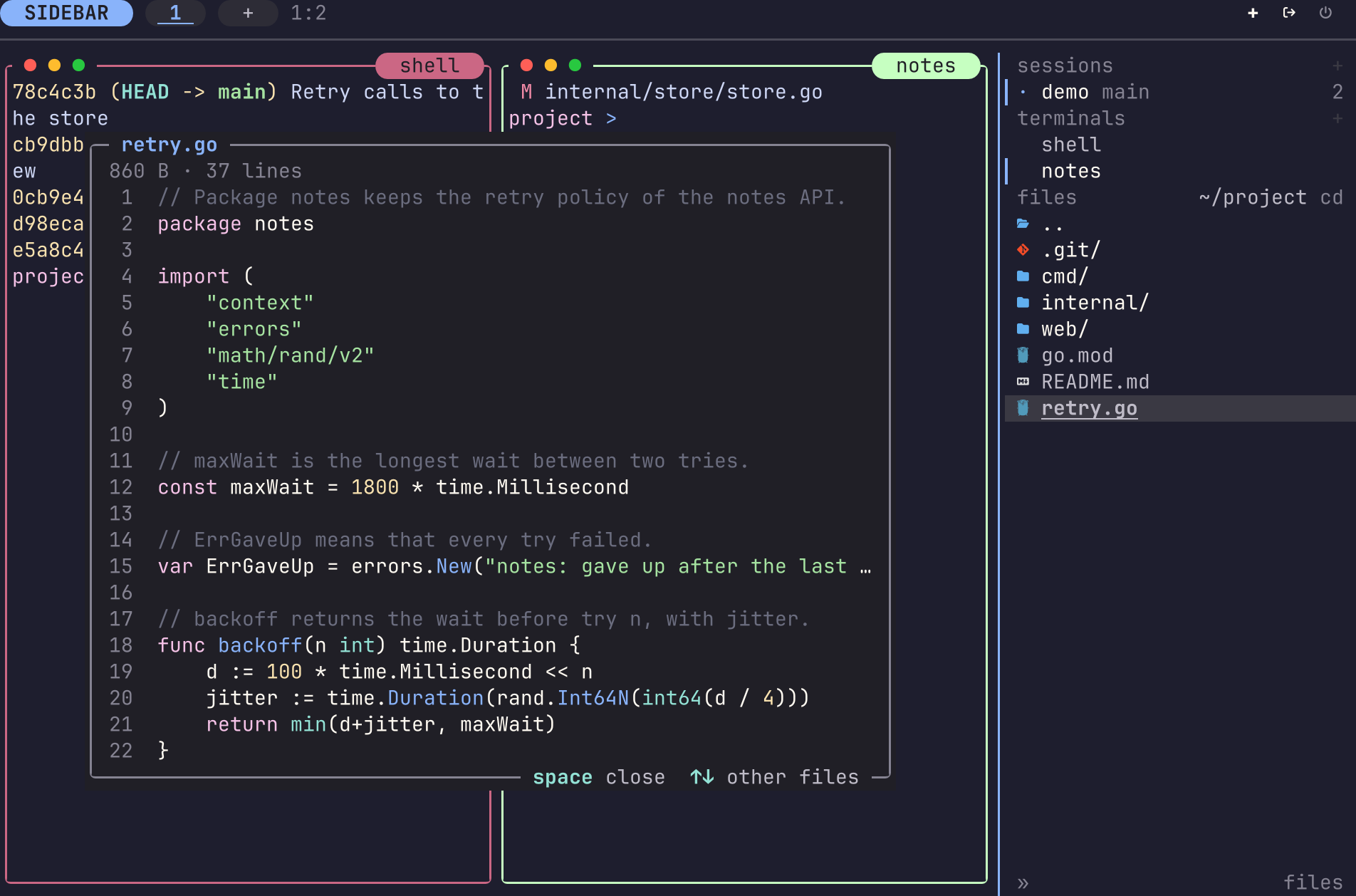
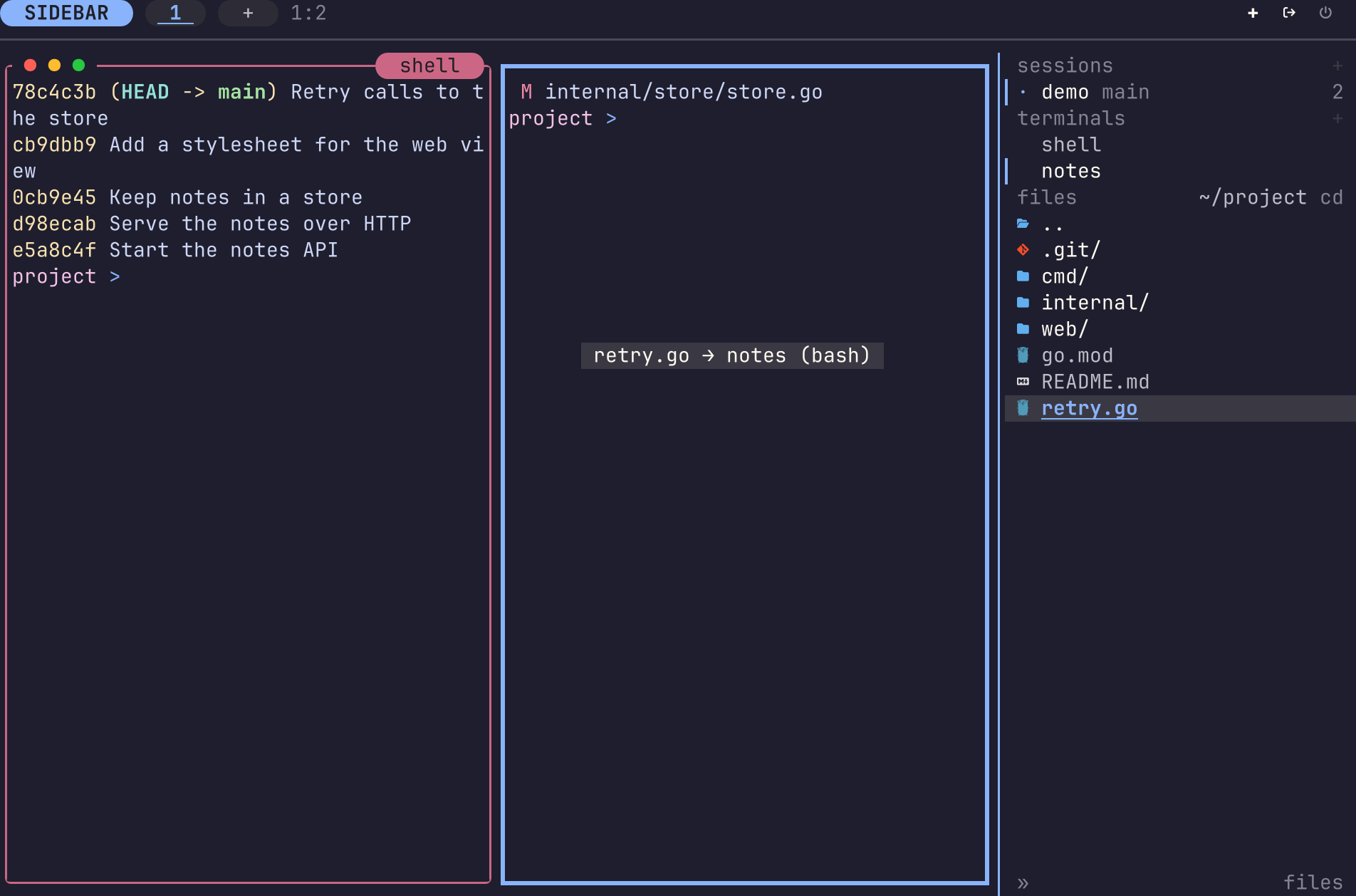
- Drag a file into a pane. Drag a row from the files section of the rail onto a pane. tuios types the path at the cursor, quoted for that pane's shell (#1335). See Drag a file into a pane.
- Quick look. Put the rail cursor on a file and press
space. You see the code with colours and line numbers, Markdown laid out, a picture, the first page of a PDF, a frame of a film, or the names in a folder. A PDF page needspdftoppmand a film frame needsffmpegon the machine that has the file (#1337). Right-click a file and pick Preview to look at that row (#1369). See Quick look. - Drag and drop between panes. Set
[panes] drag_and_drop = true. A program that speaks kitty's protocol, such as yazi 26.9 or later, can then drag files to another pane. The switch is off by default because the protocol is still settling. Thanks to @dschmidt (#1307). See The panes table. - A path picker at the cursor.
Alt+;in terminal mode, orCtrl+B ., opens a small list of the files in the pane's folder. Type to filter, andenterputs the path at the prompt (#1235). See Pick a path.
The Settled shelf
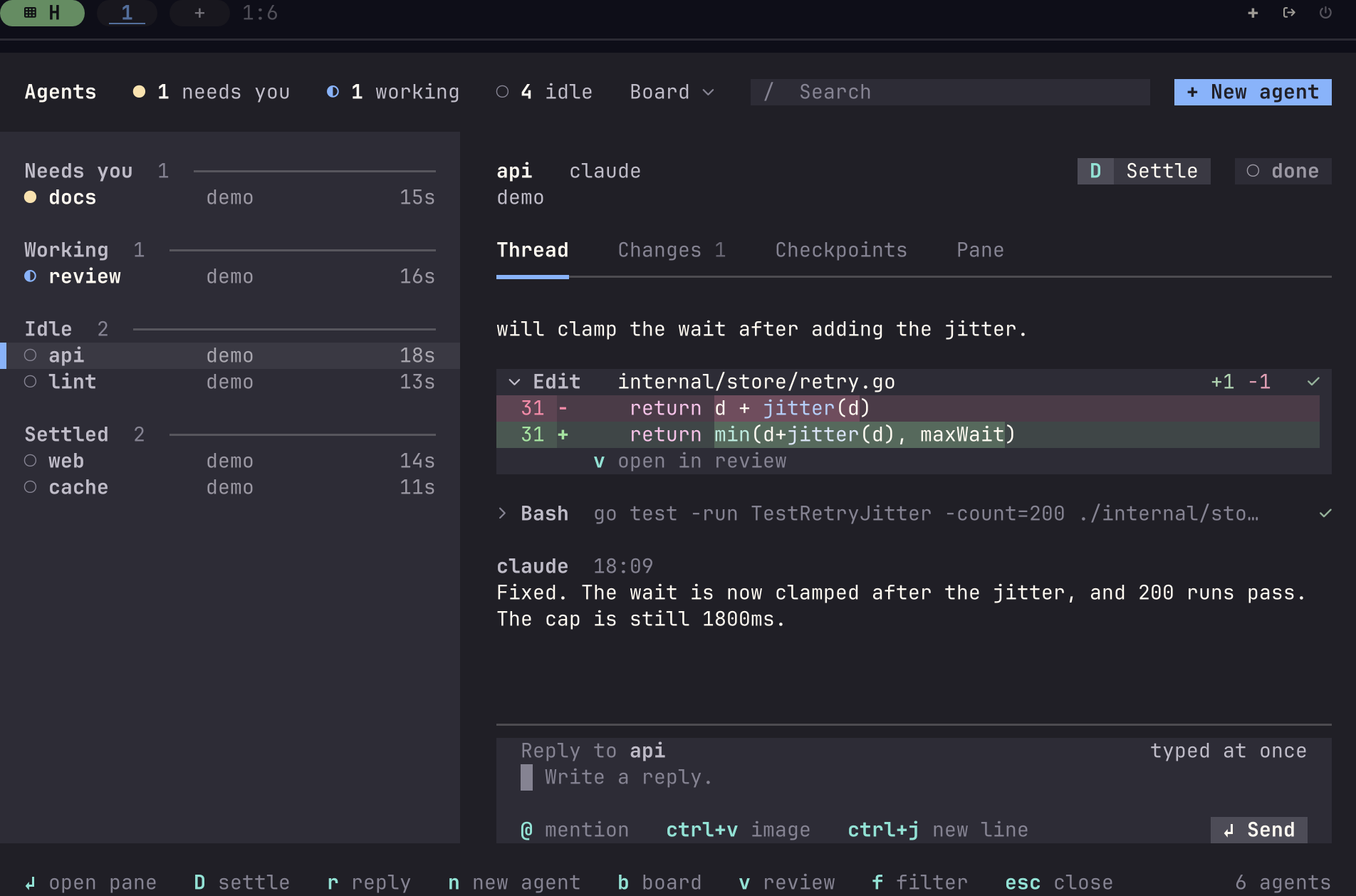
- The Settled shelf. In the agents view,
Dputs an agent on the Settled shelf. It keeps running, and it comes back by itself when it asks you something, errors or finishes a turn. Every client shows the same shelf (#1360). See Settling an agent.
Task cards and the task board
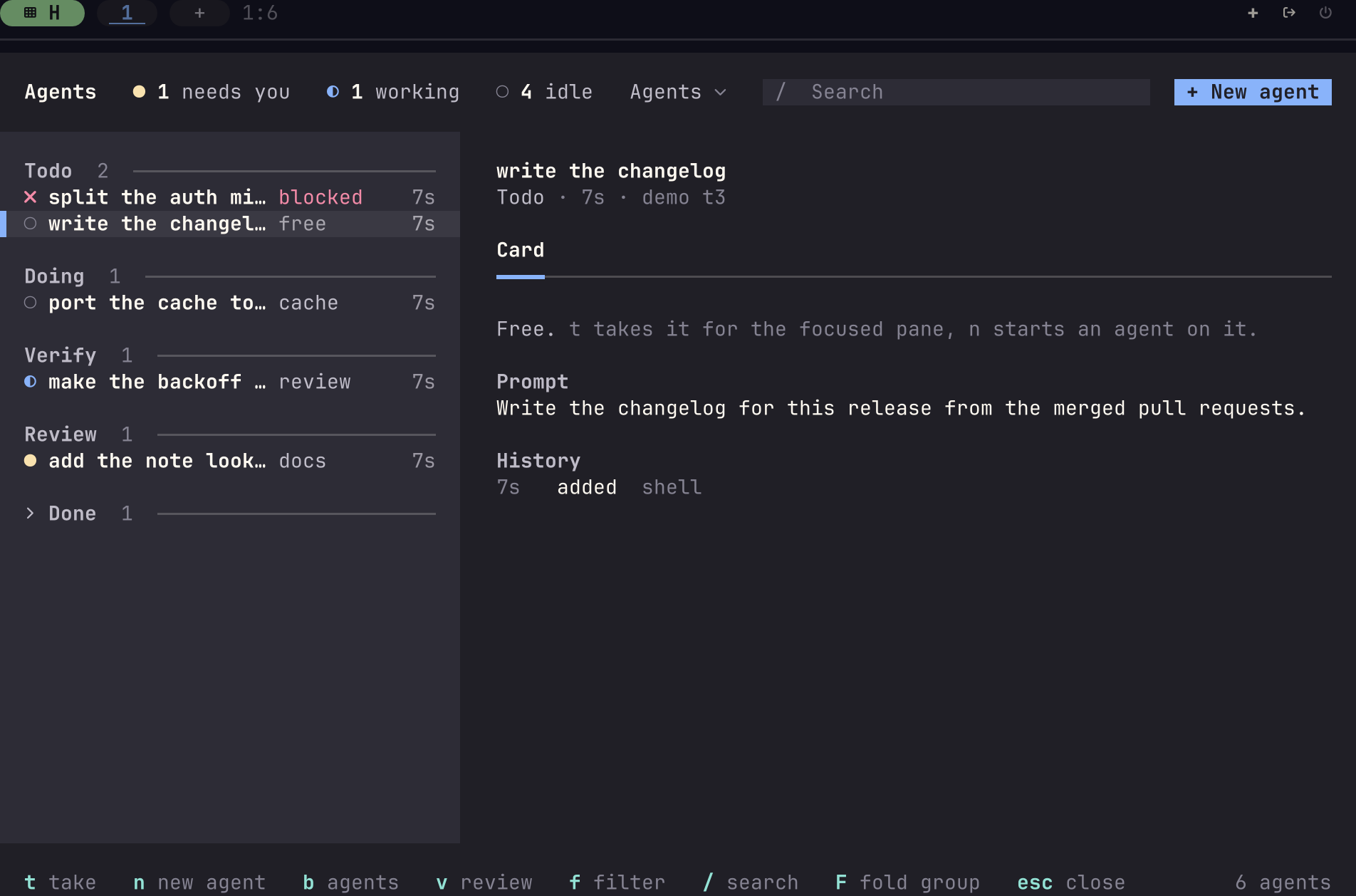
- Task cards and the task board. A session can hold task cards. Agents claim, finish, block and release them with
tuios task. In the agents view,bshows the cards grouped by stage,ttakes a card andnstarts a new agent on it. A card now moves on its own when its plan, its fan check or its pull request changes, andfanandstart-agenttake atask. Set[tasks] auto_stage = falseto stop the moves. Thanks to @shubham-tomar (#1158, #1248, #1332). See The task board.
Calm mode
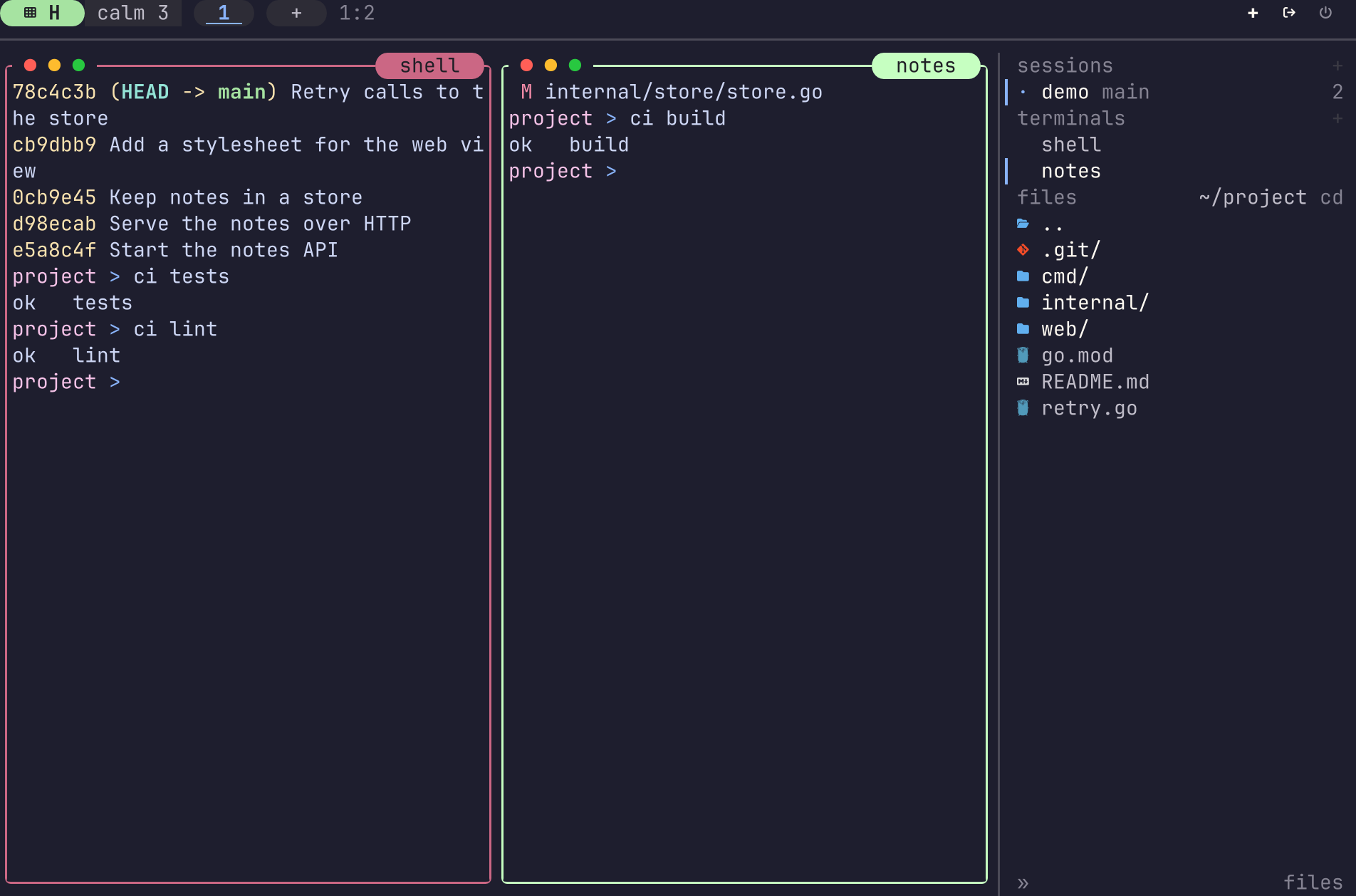
- Calm mode.
Ctrl+B Zstops all motion and quiets the dock. Messages that need you still show. Setappearance.calm = trueto keep it on (#1209). See Calm mode.
Return notes
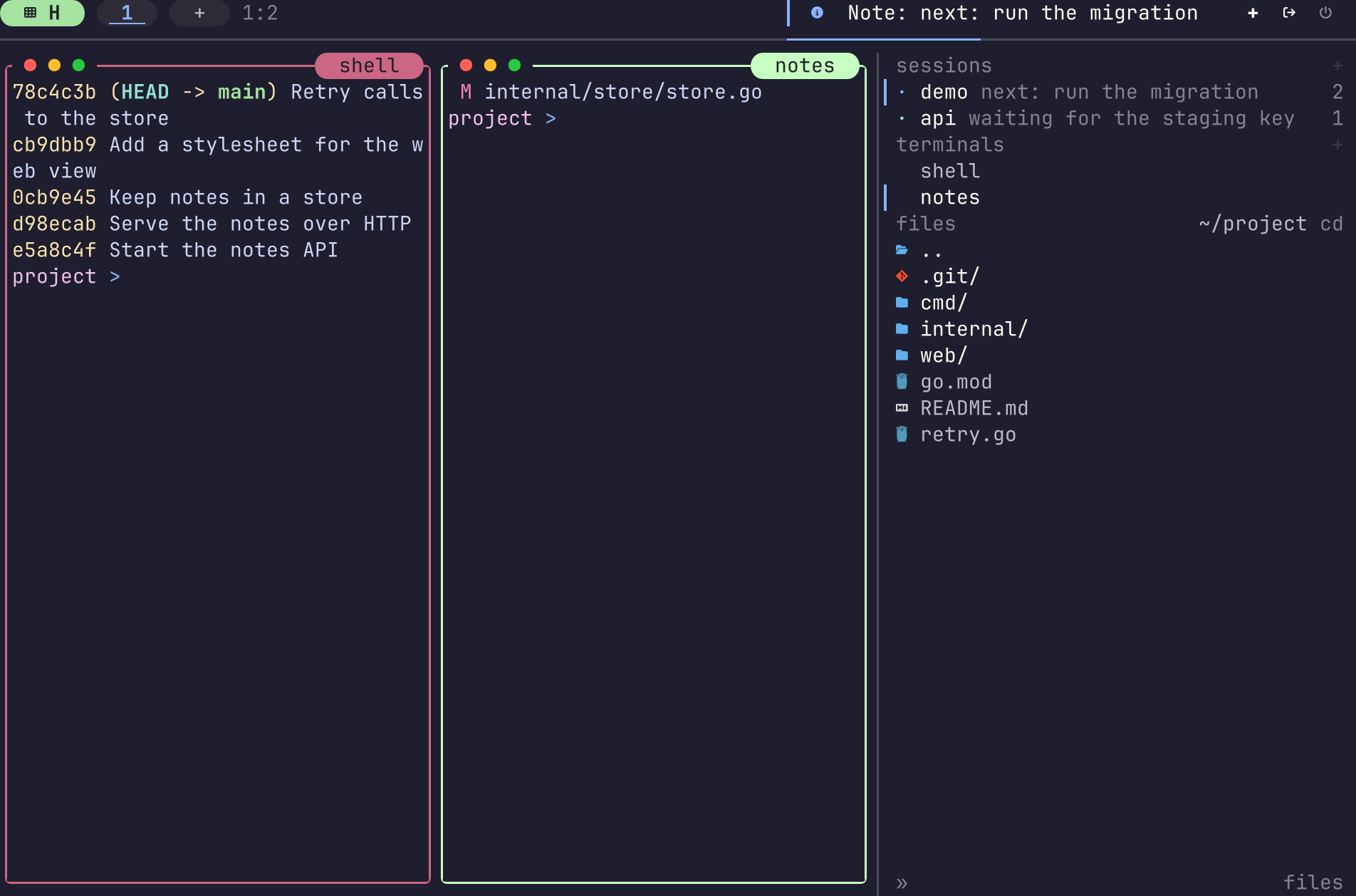
- Return notes.
tuios note set TEXTputs one short line on a session or a pane, such as what comes next. The note stays after a detach and a daemon restart (#1218). See Return notes.
A live terminal in the rail
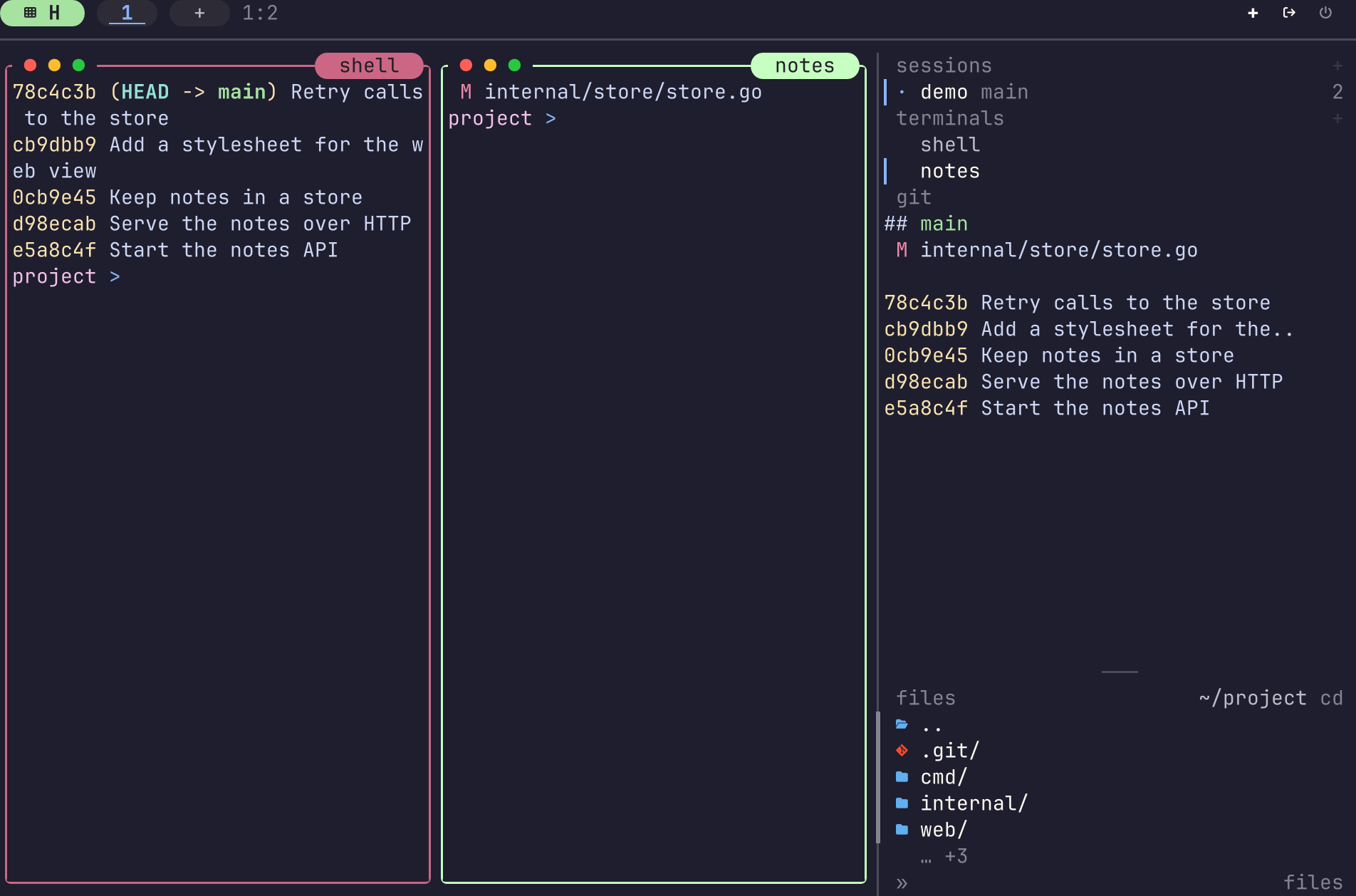
- A live terminal in the rail. A new
panesection in the rail runs a program in a real terminal under its own heading (#1221). See The pane section.
Also new
- Stage from the review. In the review overlay,
aanddstage and unstage the hunk under the cursor.AandDdo this for the whole file, andzundoes the last one (#1356). See The review overlay. - Resume many agents at once. After a restart, mark Resume rows in the agents view with
xor*, and pressyto resume all of them. The view stays open (#1334). See Many agents at once. - Nest mode. The
nestaction sends every key to the focused pane, the leader too, until you pressF12. Use it for a tmux or a tuios inside a pane. Thanks to @udiNur (#1190). See Nest mode. - One session order everywhere. The daemon keeps the order of your sessions. Move a session on one rail and it moves on every client, in
tuios ls, and after a restart. Thanks to @udiNur (#1191). - Share your look.
tuios look exportwrites your setup as a look file thattuios look applyreads. Share it in Show us your tuios setup (#1261). See look. - Termux. A new Android arm64 build runs tuios on Termux (#1230).
Agents
next_agentandprev_agentmove the focus from one agent pane to the next. Thanks to @abhijit-s (#1249).- A glyph set can name the agent state marks, one or two cells wide. Thanks to @abhijit-s (#1046).
- A queued message or a mail wake now waits while you have a draft. It waits for 3 seconds with no key from you and, for Claude Code and Codex, an empty prompt box. The row says why it waits (#1351).
Ffolds the group under the cursor in the agents view, and the fold stays after you close the view.[agents] fold_working = truefolds Working until you open it (#1354).- A hooked agent that reported
workingand then stops reporting now shows "No report for N min" on its row.silent_aftersets the time, and the default is 10 minutes. Thanks to @shonenm for the report (#1353). - Resume keeps the flags of Claude Code, Codex, Copilot, opencode and pi. A flag that turns approvals off shows a warning on the Resume row (#1359).
- When an agent's integration is missing or out of date, press
Ctrl+B jon its notice to install it. A dialog asks first (#1357). - A subagent's permission prompt clears when the subagent goes on, so the pane no longer stays on needs input. Thanks to @abhijit-s (#1362).
- A worktree under a linked folder, such as the macOS temp folder, gets its risk root. Thanks to @abhijit-s (#1363).
- tuios detects Letta Code, and reads newer screens of antigravity, grok and Codex (#1355).
tuios --skill recipeshas two new recipes: keep the machine awake while agents work, and run an agent on a schedule (#1358).- Codex approval alerts that its own reviewer decides no longer reach the Inbox (#1188).
- opencode reports arrive in the order they happened (#1326).
- tuios reads Claude Code's question form under its title line and when it wraps. Thanks to @udiNur (#1289).
- The herdr
agent startcommand waits for Codex and pi to start (#1203). - herdr plugins hold herdr's install lease while they run (#1349).
- Wide text in the agents view no longer breaks rows. Thanks to @DreamchaserLG (#1197, #1194).
Rail, sessions and worktrees
- The terminal focus keys move into and out of the rail. Thanks to @JanSmrcka (#1121).
appearance.sidebar.group_main = truegroups a repository's main checkout with its worktrees in the sessions tree. Thanks to @vvicaretti (#1157).appearance.sidebar.peek = falseturns off the session peek (#1241).- A worktree row keeps the session's own name (#1253).
- A new
after-new-worktreehook runs after a worktree is made and before its first pane starts. Use it to copy a.envfile, for example (#1322). - tuios reads branches in reftable repositories, and names a bare repository by its project. Thanks to @corinty (#1237).
- A pane follows its own window before a reused session name. Thanks to @AdrielVelazquez (#1310).
- A daemon shutdown that ends the panes keeps the saved layout (#1350).
[worktree] pathis a template that sets wheretuios worktree new, the rail andtuios fanput a worktree. An example is{{ repo_path }}/.worktrees/{{ branch | slug }}. Thanks to @maciej-lech (#1294).- Pickers and copy notices name this machine by its host name. Thanks to @nkapila6 for the report (#1325).
- A navigator row on another machine opens without freezing the screen (#1318).
Keys, panes and layout
- The pane navigator can open ready to type with
panes.navigator_search = true. Thanks to @udiNur (#1192). appearance.focus_wrap = truewraps directional focus at the edge of a tiled layout (#1323).next_hostandprev_hoststep between machines (#1321).[startup]options pick the session and pane that a plaintuiosopens (#1319).launcher.keep_open = truekeeps a launched program's pane open after it exits, with its exit status (#1315).appearance.scroll_column_presetssets the widths thatscroll_cycle_widthsteps through in the scrolling layout (#1317).- In copy mode,
oswaps the ends of a selection (#1242).^and$stop on the text of the line. Thanks to @anyingiit (#1038). - In copy mode,
ctrl+cleaves without a copy, and a bound focus key such asalt+hmoves the focus to another pane. Thanks to @Smithx10 for the report (#1372). - The ssh splits follow an ssh that a helper program started, such as
tt ssh. When a split does not follow, the dock says why. Thanks to @Smithx10 for the report (#1368). - The review overlay has keys for hunks and files. Thanks to @anyingiit (#1039).
Option+Backspace,Ctrl+WandCtrl+Backspacedelete a word in every text field, the way the shell does.src/dir1/dir2becomessrc/dir1/. Thanks to @kaashyapmurali (#1297, #1344).- An open panel takes the keys while the rail has the focus, and panels stay clear of a bottom dock. Thanks to @thecloudranger for the report (#1255).
- A switch to an empty workspace keeps terminal mode when it opens a new pane. Thanks to @nagy135 for the report (#1189).
- The key list calls the
<and>keys pane width, not master width. Thanks to @audas (#1273). - A
terminal_modebinding runs the command it returns. Thanks to @nkapila6 (#1220). - tuios warns at start only about keybindings that do not work. The doctor shows the keys a default takes from your own bindings. Thanks to @abhijit-s (#1314, #1264).
- The leader menu draws on a screen that is too small for one binding. Thanks to @udiNur (#1292).
- A new pane's shell starts at the size of its tile (#1211).
Look and feel
appearance.pane_overlays = truedraws dialogs and panels like pane windows.appearance.overlay_border_colorsets a colour for their frames. Thanks to @abhijit-s (#966).notifications.levelsets the least severe message the dock shows:info,warningorerror.notifications.log_hidden = falsekeeps hidden messages out of the log too. Thanks to @abhijit-s, and to @adamcstephens for the report (#1364).notifications.style = "plain"draws a message with no side bar and no countdown. A shortnotifications.durationno longer gives a warning. Thanks to @Soleone for the report (#1210).- Flat dock tabs can have rounded caps, and any tab can have an underline when it is active. Pills now take the
[dock.tabs]colours. Thanks to @pierloh for the report (#1346). - The dock can show the input mode on the mode pill while tiling (#1202).
- Terminal mode has the stronger border, and focus stays clear on light themes (#1172).
- Kitty images are cut around popups, dialogs and other chrome (#1177). Sixel images draw only on the frame that holds their space (#1324).
- Mermaid diagrams take the text colour on fills from your theme, and follow pele 1.12.0 (#1262).
- The Inbox no longer crashes under the gilt theme. Thanks to @drawde-nadroj for the report (#1311).
Platforms
- macOS.
tuios daemon-app installruns the daemon as an app, so panes keep local network access after the terminal app quits (#1143). The paste key pastes a clipboard image (#1187).kitten icatdraws in a local pane. Thanks to @agustinvalencia for the report (#1244). - Windows and WSL. The install script installs the Windows build when you run it from Windows. Thanks to @nkapila6 (#1268). A file copy to a host accepts a Windows drive path. Thanks to @nkapila6 (#1280). Under WSL, tuios reads a clipboard image from the Windows clipboard. Thanks to @JoaoHenriqueBarbosa (#1279). A stray
Ctrl+Spacefrom ConPTY before a shifted key is dropped (#1270). - Web. On a phone, scroll the pane strip with a finger and it snaps to a column. Thanks to @udiNur (#1193). Sixel images clear in the browser. Thanks to @YrFnS (#1222).
- The terminal is restored when tuios stops on an internal error (#1230).
Other fixes
- A stray
5uor7uno longer appears at the shell prompt after a detach or a quit. Thanks to @kaashyapmurali (#1352). - The dock's version notice goes away when
tuios restart-servermoves the client to the new daemon (#1366). - Keys you type fast into a TML text field are no longer lost (#1195).
- Keys you type while a paste reads its buffer are kept (#1320).
- The scrollback editor and the Inbox reply editor get the terminal. Thanks to @kaashyapmurali (#1306).
- An empty paste looks long enough for a clipboard image. Thanks to @abhijit-s (#1260).
- Focus by direction works from a zoom of the whole region (#1313).
tuios new-windowapplies the preselection (#1246).- A new or ended session shows on the rail at once (#1247).
tuios kill-serverwaits on the right socket (#1286).--pprofand--cpuprofilework on every long-running command,tuios sshtoo. Thanks to @Gsirawan (#1176, #1271, #1283).
Performance
- A long run of work by @Gsirawan makes tuios lighter: less work for ASCII text in the emulator, the search line and loom, smaller buffers after a flood of output, and memory given back when a session ends or its history is dropped (#1167, #1168, #1171, #1174, #1180, #1181, #1196, #1198, #1206, #1214, #1216, #1266, #1274, #1282, #1290).
- Size work pays for most of the new features. Go 1.27.3 saves about 640 KB, and code changes save about 800 KB and 115 KB more (#1342, #1376, #1336). @Gsirawan cut about 312 KiB from the Mermaid code on linux/amd64 (#1276), and more from cold sorts (#1186, #1178). The linux/amd64 binary is 48.8 MB, against 47.9 MB in v0.11.1.
Learn tuios
- The browser tour at tuios.dev/learn now covers keybind presets, the agents view with pretend agents, the files rail, review, worktrees,
tuios ship, TML surfaces, Mermaid diagrams and charts (#1240, #1254, #1256, #1258, #1259). - The tour and
tuios tutorread the same lessons, so the two stay in step (#1338).
Thank you
I am grateful to everyone who sent code for this release: @Gsirawan, @abhijit-s, @udiNur, @shubham-tomar, @nkapila6, @AdrielVelazquez, @kaashyapmurali, @dschmidt, @maciej-lech, @anyingiit, @corinty, @DreamchaserLG, @JanSmrcka, @JoaoHenriqueBarbosa, @vvicaretti and @YrFnS.
I also thank everyone who sent reports and requests: @adamcstephens, @agustinvalencia, @audas, @CallMeLaNN, @chambers75, @drawde-nadroj, @electricalen, @Heixier, @kdnk, @konstantinkreft, @mjumelet, @MunsuBahk, @nagy135, @pierloh, @reflog, @shonenm, @SignusV, @Smithx10, @Soleone, @thecloudranger, @user4302, @YOCRRZ224 and @zalewskigrzegorz.
Full changelog: https://github.com/Gaurav-Gosain/tuios/compare/v0.11.1...v0.12.0