latest release13 min read
v0.10.1
A reply editor with line breaks, long pastes and images, and an agents view of every agent you run. A theme editor, light and dark theme pairs, styles for every part of the chrome, tuios look for shared setups, and keybind presets for tmux, screen and zellij. An idle tuios now runs no timer.
GGGaurav Gosain
tuios 0.10.1 is a big one for a point release. You can now write a real reply to an agent, with line breaks, long pastes and images, and see every agent you run in one list. tuios also got much easier to make your own: a theme editor inside tuios, light and dark theme pairs, styles for the borders, the titles, the rail and the dock, and tuios look to apply a setup that someone shared. If you come from tmux, screen or zellij, a keybind preset gives you the keys you know. And an idle tuios now does almost nothing: no timer runs while nothing changes.
Read Upgrading before you update. The clock, the prefix badge and the pane environment changed.
The full list is at tuios.dev/releases.
Watch
What the clip shows
- Omarchy style, cozy Catppuccin, synthwave, paper and amber CRT.
- Everforest, scrolling Nord columns, Kanagawa ink and a hacker wall.
- Zen, maximal Gruvbox and mono.
- The theme editor gives the accent role a new colour, applied at once.
What the clip shows
- tuios finds your tmux.conf and offers its keys.
- ctrl+b, then a key. The mode pill shows the prefix.
- zellij and screen keys too. Change them any time.
- Tools that call tmux get tuios panes through tuios tmux-shim.
The clips have music and no narration. Each clip has captions.
Show me your setup in discussion #849, and tell me what you still miss from tmux in discussion #850.
Install
brew install tuios                     # Homebrew (macOS, Linux)
yay -S tuios-bin                       # AUR (tuios-web-bin for the web server)
nix run github:Gaurav-Gosain/tuios     # Nix
curl -fsSL https://raw.githubusercontent.com/Gaurav-Gosain/tuios/main/install.sh | bash
go install github.com/Gaurav-Gosain/tuios/cmd/tuios@v0.10.1
docker run -it --rm ghcr.io/gaurav-gosain/tuios:v0.10.1
A binary installed by the script or from an archive updates with tuios update.
Highlights
The reply editor
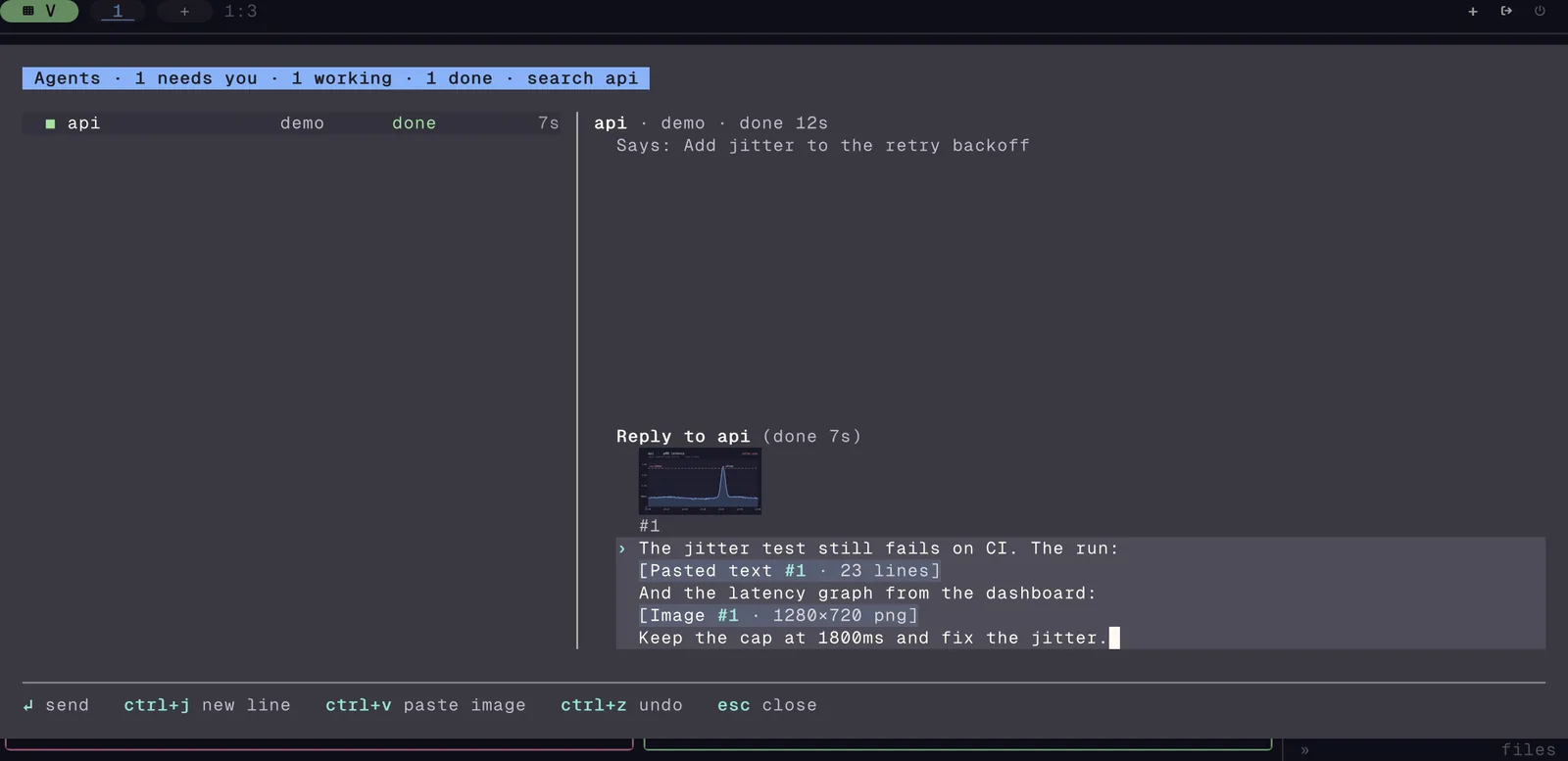
The Inbox reply is now a full editor (#769, #770, #771).
- It has more than one line.
entersends.ctrl+j,shift+enteroralt+enteradds a line. The word keys,ctrl+u,ctrl+k, undo (ctrl+z) and redo work as in a shell. - A long paste becomes one block, such as
[Pasted text #1 · 42 lines].ctrl+oopens the block,ctrl+emakes it editable text, andbackspaceremoves it. - A reply can carry a paste of up to 8 MB. When the message is too large to type, tuios writes each block to a file and gives the agent the path (#812).
upbrings back what you sent to this agent before, andctrl+rsearches it.ctrl+gopens the draft in your$EDITOR(#832).@names a pane, an agent or a file of the pane's folder (#826).esckeeps the draft.ron the same pane opens it again.- You can reply to an agent on a linked machine. Before, the Inbox said "Attach there to reply" (#835).
- The mailbox and the Inbox's other text fields use the same editor (#828, #830).
Image paste
ctrl+vin the reply editor attaches the image on the clipboard. A dropped image file works too (#814).- The draft shows each image as a small preview above the text, and
ctrl+oshows it larger (#817). - tuios gives the image to Claude Code, Codex, OpenCode, Kilo, Crush and pi in the way each one reads it (#814, #833).
- Limits: 8 images a message, and 8 MB for the whole message.
The agents view
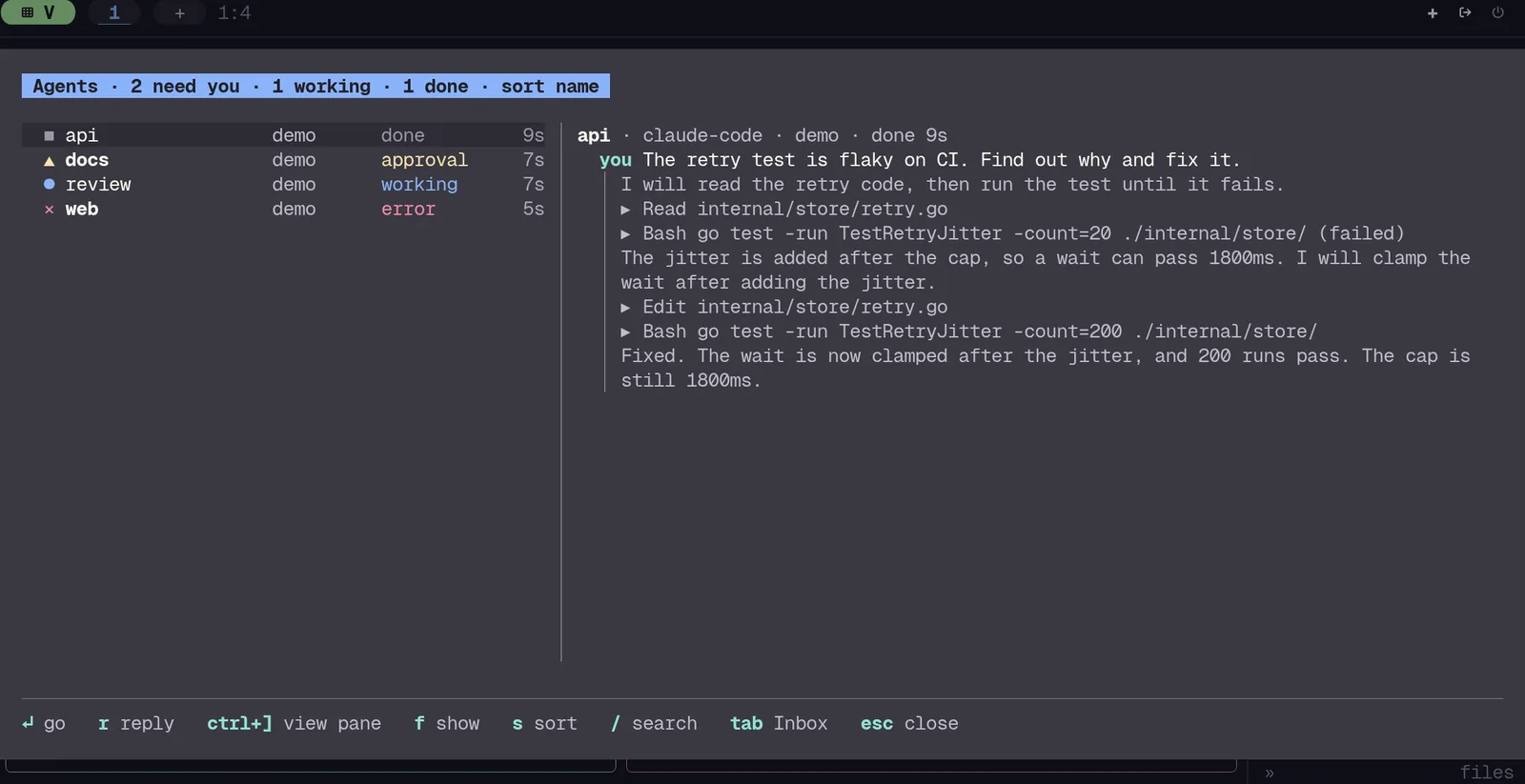
tab in the Inbox shows every agent in one list: the agents of this session, of your other sessions, and of linked machines (#819).
- Each row shows the state, the session, what the agent does, how long it has been in that state, and what waits for it.
ffilters,ssorts and/searches.- On a wide screen, the agent's thread shows beside the list: what you asked, what it said, and the tools it ran (#822).
ctrl+]shows the agent's pane.ctrl+b ibrings you back to the same agent, with your drafts (#823).spacemarks agents and*marks all. Then reply, allow, deny, dismiss or snooze all of them at once (#825).
The theme editor
The theme editor is a side sheet that changes the colours of a theme while the whole screen shows the result (#827, #829). Open it from the command palette with "Edit theme", or with ctrl+o in the theme picker for a new theme.
- The Quick tab makes a whole theme from two colours: an accent and a surface.
- The Roles and Pane colours tabs set each colour. Each row shows its contrast, and
ffixes a colour that is too hard to read. - When you move to a role, every part of the screen that uses it flashes.
uundoes,xresets andctrl+ssaves to your themes folder.
Ricing
Every part of the chrome now has a style you can set. All of these are in the settings page, and set-config changes them live.
- Light and dark pairs.
appearance.theme_lightis the theme for a light terminal. tuios follows your terminal when it switches between light and dark (#818). - Borders. The focused border takes a colour for copy mode and for an agent that waits for you (#820).
appearance.border_focused_gradientdraws a gradient on it (#821). - Titles.
appearance.window_title_styleispill,taborplain.window_title_alignputs the title on the left, in the centre or on the right (#824). - The rail.
appearance.sidebar.row_style(bar,marker,underline,pill),header_stylewith section icons, anddensity = "roomy"(#831, #834, #836). - The dock. Workspace tabs show a mark for a bell, for new output, and for an agent that waits (#837). The mode pill shows when the leader key waits (#811).
- Theme roles. A theme can colour each border state, the rule, the status colours, the dots and the grounds (#815).
- Your terminal's colours. With
theme = "none", the dialogs, the rail and the dock now use greys made from your terminal's own background (#816). - Themes from other themes. A theme file can name a
baseand change only some colours (#789). tuios reloads a theme or glyph file when you save it.tuios theme reloadis a hook for pywal and matugen (#791). - Share a theme.
tuios theme exportprints a theme file, also as base16.tuios theme shareprints the theme as one line you can paste (#813). - The theme picker.
ctrl+fshows dark or light themes only,ctrl+rpicks one at random,ctrl+ycopies the id, andctrl+ddeletes a theme of yours (#792).
tuios look
tuios look applies a setup that someone shared, on top of your config (#859, #861).
tuios look apply tuios.dev/r/<id>   # or an id, an https URL or a file
tuios look show
tuios look remove- A look sets the theme, the glyphs, the borders, the dock, the rail, the layout and other parts of the look. It cannot set keys, hooks, commands, hosts or anything else that runs a program.
- tuios shows each change and asks first.
- The look goes in
config.d/look.toml. Yourconfig.tomldoes not change, andtuios look removeputs everything back.
The gallery on tuios.dev has looks to try in your browser, with the command to apply each one.
Keybind presets
keybindings.preset gives you the keys of another multiplexer (#800, #801, #802).
tmux:ctrl+b, then%and"to split,zto zoom,c,nandpfor workspaces, and the rest of the tmux keys.screen:ctrl+a, withctrl+a ato sendctrl+ato the pane.zellij:ctrl+g, then a mode key.- The tuios features that a preset moves are under the leader, then
ctrl+t. Uin window mode opens the preset picker. It shows the keys that your shell loses with each preset.- On first start, tuios finds your
tmux.conf,.screenrcor zellij folder and offers the preset. It never switches by itself. - Your own bindings win over the preset.
tuios keybinds doctorlists the preset keys that your bindings take (#806). keybindings.repeatsets which actions stay armed after the leader, as tmuxbind -rdoes (#796).- New actions with no default key:
last_workspace,break_pane,last_sessionandsend_prefix(#795).
Images in screenshots
A screenshot that you take in tuios now shows the images in a pane: kitty graphics, kitty images in Unicode placeholder cells, and sixel. Before, the screenshot showed blank cells (#855, fixes #678). The image previews of the reply editor and the launcher icons show too (#863). tuios screenshot from the command line still draws no images, because the daemon does not keep them.
tuios.dev/shot
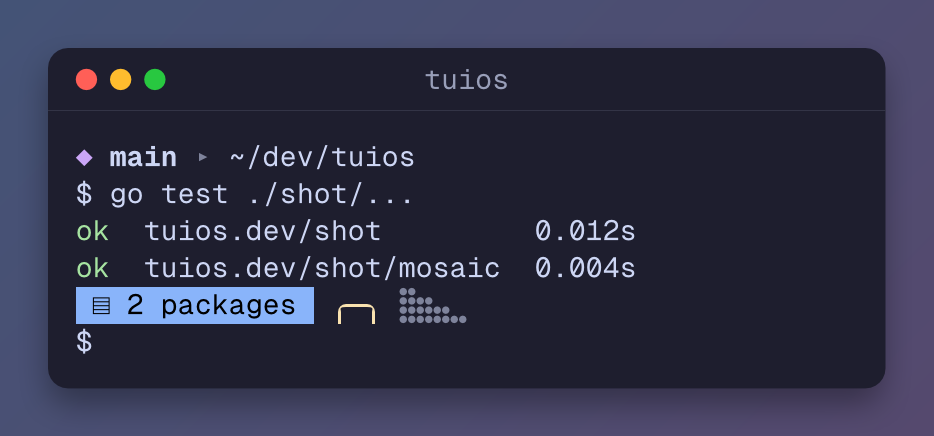
The screenshot renderer of tuios is now a Go library, tuios.dev/shot (#846). It turns a grid of terminal cells into SVG, PNG, HTML, ANSI or text. It has fallback fonts for glyphs that the main font does not have, and v0.2.0 draws images on the grid (#862). It reads the screen of a tuios.dev/vt emulator directly.
Features
- Wait for a program.
tuios new-window NAME --keep-open --wait -- CMDruns a program in a pane, waits for it, and exits with its status.--keep-openkeeps the pane after the program exits, with its exit status under the output (#764). - Cleaner captures.
tuios capture-pane --unwrapjoins the rows that the terminal wrapped, and--trimdrops the blank lines at the end (#766). - Pause focus follows mouse.
appearance.focus_follows_mouse_pause = "ctrl"or"alt"keeps the focus where it is while you hold that key (#768, fixes #750). - Spaces in the rail. The rail's sessions section has a heading for each space (#760).
tuios lswith no daemon andtuios ls --all-hostsgroup sessions by space too (#761). Thanks to @abhijit-s. - Close a workspace from its tab. A right-click on a workspace tab in the dock has a Close row (#786). Thanks to @abhijit-s.
- A skill for your agent.
tuios integration installnow also installs a short tuios skill for Claude Code, Codex, opencode and Pi (#765). At the start of a session, Claude Code and Codex learn which tuios pane they run in (#767). - Tapes without the player.
[tape] show_status = falsehides the tape's RUNNING pill, for screen recordings (#841). - The browser build. A page that runs tuios in the browser can set the look and input options with
set, and load a look's theme withthemeJSON(#843, #860). - Live demos that fit. In the browser, the practice shell lays its output out again when a pane changes width. The logo of
fastfetchno longer breaks apart after a split (#864).
Fixes
- The agent's environment. When an agent's tool call started the daemon, every pane got the agent's
NO_COLORand session variables. Programs drew without colour, and Codex in a pane never reported its state. Panes now leave these variables out (#799, fixes #798). Thanks to @syz51. - Kitty images that ask for one side. An image placed with only a width or only a height now keeps its aspect. Before, a cover in go-musicfox showed as a thin strip (#853, fixes #851). Thanks to @ryan4yin.
- Colours at 256 and 16 colours. Theme colours now step down to the right palette entry. Nord's background was teal at 256 colours, and Latte's red was grey (#858, fixes #510).
- Panels over a full-screen pane. Over one pane that filled the screen, the close dialog, the Copies panel, the glyph picker, the dock and section editors and the copy dialog took the keys and drew nothing. They show now (#786, #838). Thanks to @abhijit-s.
- Theme reload on macOS. A themes folder that is a symlink, as home-manager and stow make, and
tuios theme reloadnow reach a client on macOS and the BSDs (#839). Thanks to @abhijit-s. - Repeat after the leader. The resize and scroll actions now repeat after the leader as they should. Before, a second press went to the pane (#773).
- Picker previews on served clients. Over
tuios sshandtuios-web, an arrow key in the theme or glyph picker changed the look for every other guest. The pickers now preview only for a local client (#788). - Settings saves. Two saves in a row could land in the wrong order and put the old value back. They now land in order (#840).
- The ZOOM notice goes away when the pane leaves zoom (#856).
- Smooth animations. The theme transition and the other animations now keep a steady 60 frames a second (#774).
- Tapes. The which-key menu shows after a tape's leader key, and a tape that ends on
Sleepwaits for it (#854). --pprofwith start-server now reaches the daemon (#775). Thanks to @abhijit-s.
Performance
An idle tuios now sleeps. No timer runs in the client or the daemon while nothing changes.
- The client. The frame ticker stops at idle, and the maintenance tick runs only when a job is due (#781, #782, #787). With one idle client, CPU went from 0.20% to 0.05%, and context switches from about 130 a second to 9. With the clock on, from 0.5% to 0.17%.
- The clock draws minutes by default, so it wakes the client once a minute, not every second (#790).
- The daemon. The state saver, the agent monitor, the stall monitor and the cleanup loop sleep until something happens (#776, #777, #778, #779). The daemon tells the client when the session list changes, so the client no longer asks every 3 seconds (#794). Daemon context switches with a client attached went from about 25 a second to under 2.
- Memory. The daemon's queue for each pane and client starts small and grows with the backlog. With 50 idle panes, the live heap went from 30 MB to 15 MB (#785). The client frees the spare buffers of its panes, as the daemon does since v0.10.0 (#762). Thanks to @abhijit-s.
- Output. The daemon no longer allocates for each chunk of pane output. A coloured flood scans about twice as fast (#783).
- Binary size. The size budget is now 37,988,000 bytes on linux/amd64 and 35,719,000 on darwin/arm64. In v0.10.0 it was 36,620,000 and 34,465,000. The reply editor, the agents view, the theme editor, the styles, the presets,
tuios lookand images in screenshots take the difference. The which-key menus got 24 KB smaller to pay for part of it (#805). The ceiling stays at 40 MB.
Upgrading
The daemon
A v0.10.0 daemon works with a v0.10.1 client, and the reverse. The new fields are optional in both directions. Images in a reply, replies to another machine, the session list push and the idle changes need the new daemon. To get them, restart the daemon:
tuios kill-serverThis closes every pane in every session, so save your work first.
The clock
The dock clock now shows 15:04, with no seconds. To get the seconds back:
[appearance]
clock_format = "15:04:05"
The prefix badge
While the leader waits for a key, the dock's mode pill shows it. The floating PREFIX badge no longer shows. To get the badge back:
[appearance]
dock_prefix_indicator = "badge"
The badge still shows when the dock is hidden.
The pane environment
Panes no longer get NO_COLOR, CLICOLOR, CLICOLOR_FORCE and FORCE_COLOR, or the session variables of Claude Code and Codex, from the command that started the daemon. If you want NO_COLOR in your panes, set it in your shell's startup file.
Colours at 16 colours
At 16 colours, a pane's ANSI colours now go to your terminal as slots 0 to 15, and your terminal paints them. Before, tuios sent the theme's colours stepped down, and some came out wrong. A theme ground paints nothing at 16 colours.
New config keys
The defaults keep the old behaviour, except for the clock and the prefix badge above.
[keybindings]
preset = ""                         # tmux, screen, zellij
# repeat = ["..."]                  # the actions that repeat after the leader. [] turns repeat off

[appearance]
theme_light = ""                    # a theme for a light terminal
border_focused_gradient = ""        # "accent accent_bright"
border_gradient_angle = 45
window_title_style = "pill"         # pill, tab, plain
window_title_align = "auto"         # auto, left, center, right
dock_prefix_indicator = "pill"      # pill, badge
focus_follows_mouse_pause = "off"   # ctrl, alt, off

[appearance.sidebar]
row_style = "bar"                   # bar, marker, underline, pill
header_style = "auto"               # auto, plain, rule, pill, icon
density = "normal"                  # normal, roomy

[dock.tabs]
attention_fg = ""
bell_marker = ""
activity_marker = ""

[tape]
show_status = true
See CONFIGURATION.md and THEMES.md.
For developers
- The screenshot renderer moved from
internal/shottoshot/, thetuios.dev/shotmodule, andinternal/mosaictotuios.dev/shot/mosaic.go.worknow holdsshottoo. - The reply editor is in
internal/composer, with no import of a tuios package. I plan to tag it astuios.dev/composerafter this release (#848). - The binary size budgets went up in commits of their own. See
docs/perf.md.
Contributors
Thank you to everyone who sent a pull request for this release:
- @abhijit-s: space headings in the rail (#760), spaces in every
tuios ls(#761), the client's spare buffers (#762),--pprofwith start-server (#775), closing a workspace from its tab (#786), panels over a full-screen pane (#838) and theme reload on macOS (#839) - @syz51: the agent's environment in panes (#799)
- @ryan4yin: kitty images that ask for one side (#853)
And thanks to everyone who reported bugs and asked for features: @kdnk for the focus follows mouse pause (#750), @syz51 for the agent's environment (#798), @iTerminate for images in screenshots (#678) and @ryan4yin for the go-musicfox cover (#851).
Full Changelog: https://github.com/Gaurav-Gosain/tuios/compare/v0.10.0...v0.10.1